
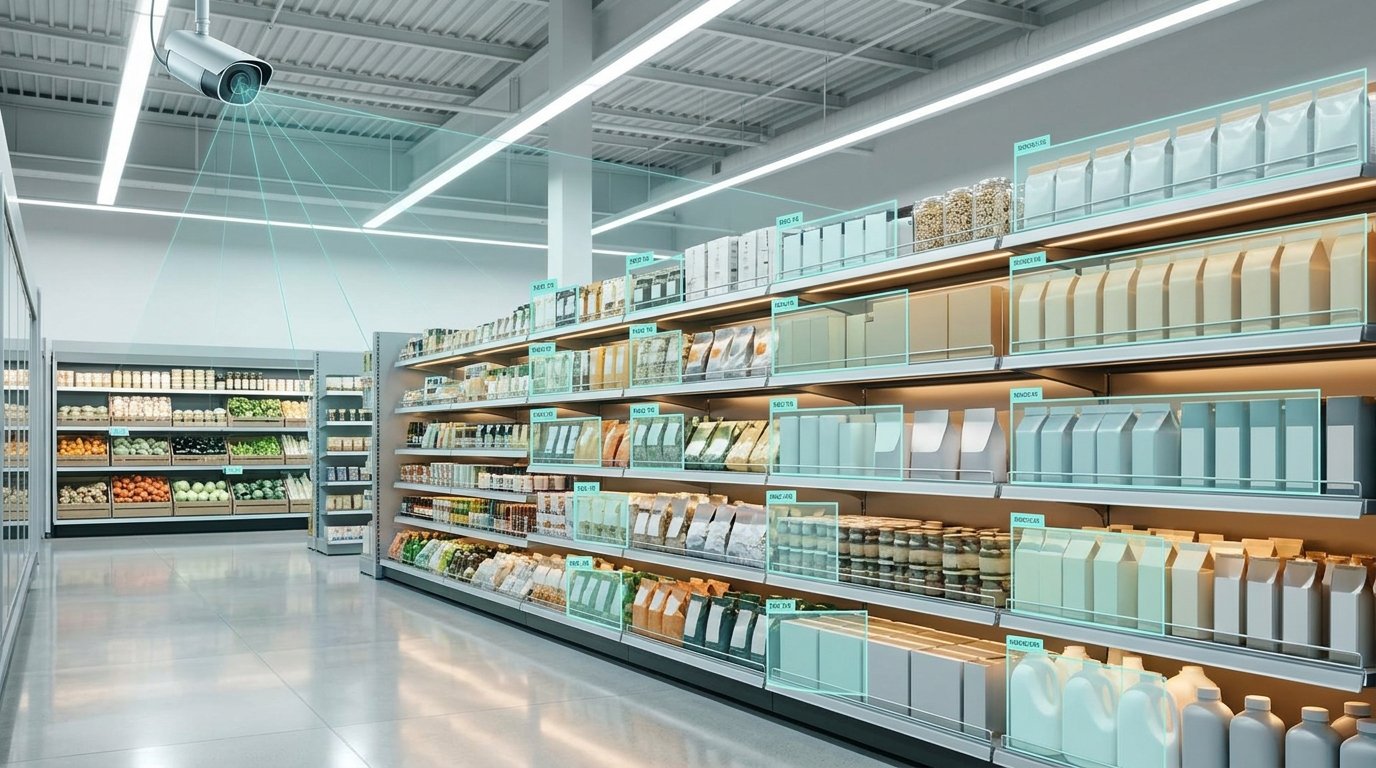
Computer Vision in Retail guide is for founders, CTOs, product leaders, and operations teams who need a practical view. It covers how retail vision systems are built, which computer vision use cases in retail tend to justify the effort, how to measure results, where these systems break, and how to move from a promising pilot to a dependable production rollout.
What Is Computer Vision in Retail and How Does It Work?
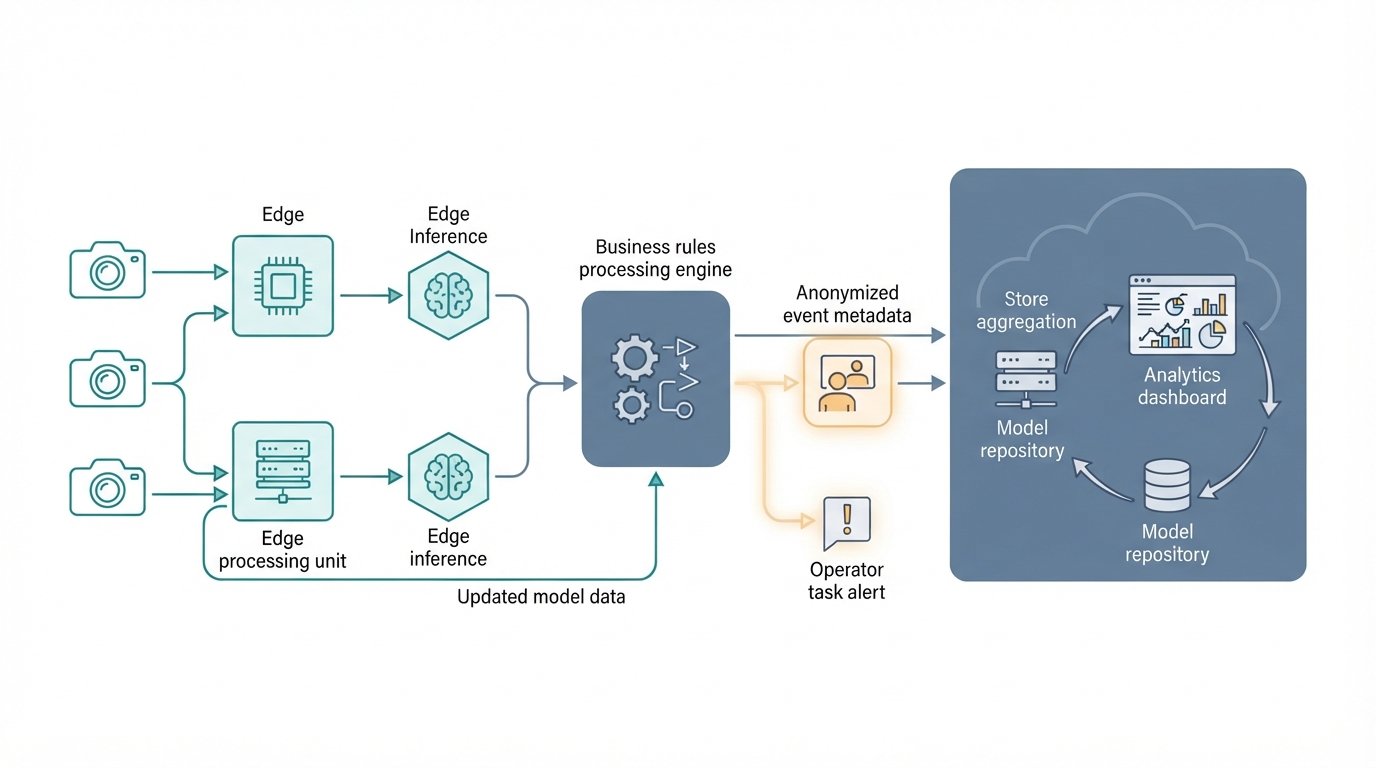
Computer vision in retail turns camera frames into structured events that software can act on, such as "gap detected on aisle 7, bay 3" or "item passed the scanner without registering." It works as a pipeline. Images are captured, models detect, classify, track, or read objects, business rules filter the results, and the output flows into inventory, task, or security systems.
A model that recognizes a cereal box is only one part of that chain. Most of the engineering effort goes into everything around the model: camera placement, data quality, rules that decide when a detection matters, and integrations that put the right alert in front of the right person.
The Core Retail Vision Pipeline
A typical production system has six layers:
- Capture: Fixed ceiling or shelf cameras, existing CCTV, handheld devices, or cameras mounted on mobile robots. Camera angle and lighting set the upper limit on accuracy.
- Ingestion and preprocessing: Video streams are decoded, sampled (you rarely need every frame), resized, and sometimes corrected for lens distortion or glare.
- Inference: One or more models analyze each frame or clip. This is where detection, classification, tracking, and text reading happen.
- Post-processing and business logic: Raw detections become meaningful events. For example, a shelf gap only becomes an alert if it persists across several frames and maps to a SKU that should be in that position.
- Integration: Events are pushed to task management apps, inventory systems, point-of-sale (POS) data, or security dashboards.
- Human review and feedback: Staff confirm or reject uncertain alerts. Those decisions become labeled data that improves the next model version.
Managed cloud platforms follow a similar pattern. Google Cloud's vision platform documentation describes creating streams, ingesting data, building applications on top of those streams, and searching stored visual data.1
The Models Behind Retail Computer Vision
Several model types often work together in one system:
- Object detection: Locates objects in an image and draws a bounding box around each one. YOLO-family models are a common choice for real-time detection.
- Classification: Assigns a label to an image or region, such as a product category or "damaged package."
- Segmentation: Labels images at the pixel level. It is useful for measuring exact shelf space or separating overlapping items.
- Multi-object tracking: Follows the same object or person across frames. This is essential for checkout and traffic analytics, where you care about movement rather than single snapshots.
- Optical character recognition (OCR): Reads text from images, such as shelf labels, price tags, and expiry dates.
- Embedding-based similarity search: Converts a product image into a numeric vector (an embedding) and compares it with a gallery of reference images. This approach is common for fine-grained SKU recognition because a new product can often be added with reference photos instead of retraining a full classifier.
- Vision-language models (VLMs): Models that answer natural-language questions about images. They are flexible for exploratory analysis or low-volume audits. They are usually slower and more expensive per frame than a specialized detector, so many teams use them selectively rather than on every stream.
Edge, Cloud, or Hybrid Architecture
Where inference runs shapes cost, latency, and privacy:
- Edge inference runs models on hardware inside the store. It keeps raw video local, reduces the bandwidth needed to send footage to the cloud, and supports real-time responses such as checkout alerts.
- Cloud inference centralizes compute and simplifies model updates. It suits batch jobs like nightly shelf audits or catalog image processing.
- Hybrid is the most common production pattern. Lightweight models filter events at the edge, and the cloud handles heavier analysis, aggregation across stores, and retraining.
One practical lesson: managed platforms change. Google's documentation notes that Vertex AI Vision was deprecated in June 2026, with an end-of-life date of September 30, 2026, and points users to the Cloud Vision API and other services as migration paths.12 If your retail vision stack depends on a single managed product, design clear interfaces around it so you can swap components without rebuilding the whole system.
Computer Vision Use Cases in Retail
The strongest computer vision applications in retail target a narrow, visual problem that staff already spend time checking by hand. Shelf monitoring, label verification, checkout loss prevention, and traffic analytics are the most common in physical stores. Visual search and automated product tagging lead in ecommerce.
Shelf Monitoring and Planogram Compliance
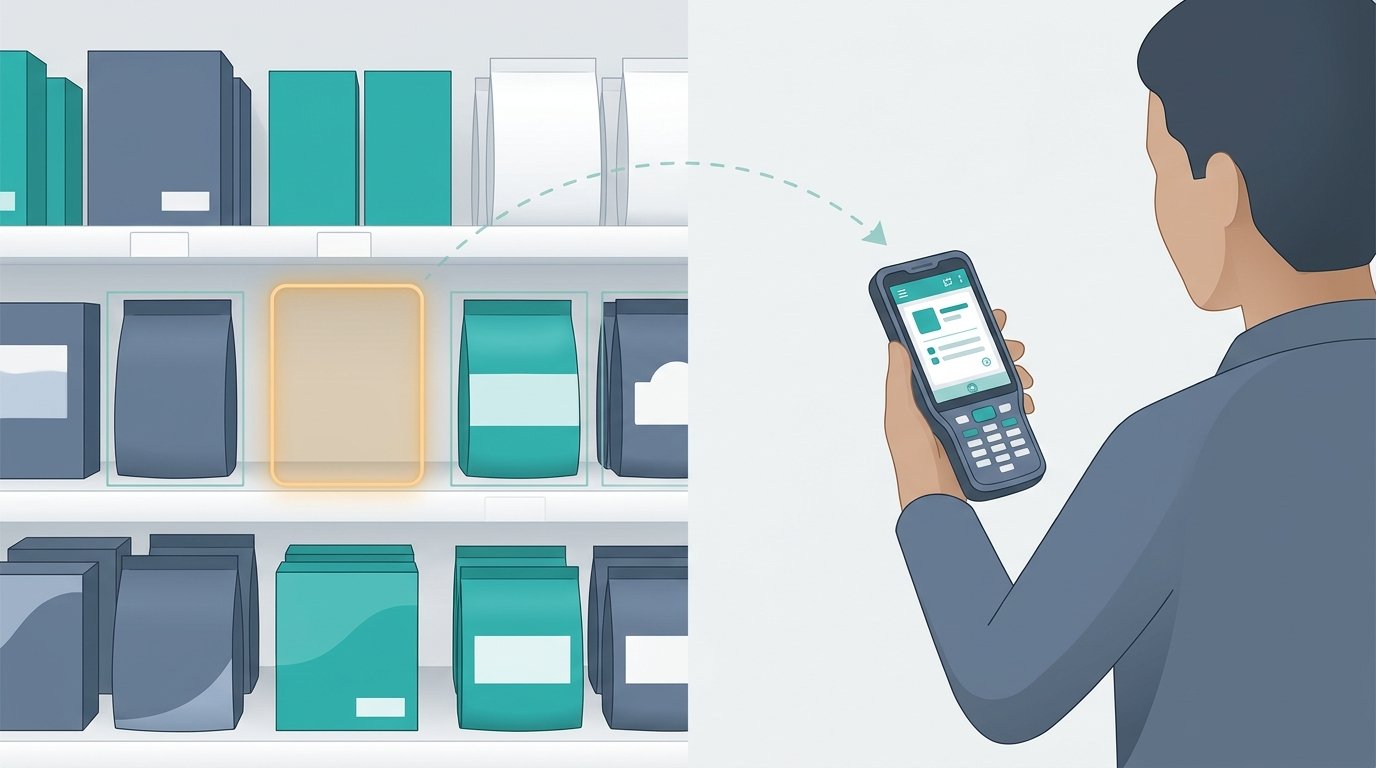
Cameras capture shelf images at set intervals. Models detect product facings, identify SKUs, and find gaps. The system then compares what it sees with the planogram, which is the retailer's diagram of where each product should sit. Alerts go to store associates as restock or fix-it tasks.
The hard part is fine-grained recognition. Many products look nearly identical apart from flavor or size. Systems that combine detection with embedding-based matching against reference images usually handle this better than a single large classifier.
Price Label and Promotion Verification
OCR reads shelf-edge labels and promotional signage. The system then checks them against the price recorded in the POS or pricing system. A mismatch generates a correction task. This use case is attractive because the ground truth (the price database) already exists, which makes accuracy easy to measure.
Self-Checkout Monitoring and Loss Prevention
Overhead cameras watch the scanning area. The system cross-checks what the camera sees against transaction data from the POS. When an item appears to pass the scanner without registering, it prompts the shopper or alerts an attendant. Good designs treat these as prompts and review events rather than accusations, because both the model and the shopper can be wrong.
Store Traffic, Occupancy, and Queue Analytics
Person detection and tracking produce counts, dwell times, and queue lengths without identifying individuals. Retailers use these signals for staffing, opening extra checkout lanes, and judging how displays perform. Google Cloud's documentation includes tutorials for building an occupancy count app and an occupancy analytics app that adds forecasting, which shows how common this pattern has become.3
Backroom, Receiving, and Distribution Centers
Vision is not limited to the sales floor. Cameras at receiving docks can count parcels, read labels, and flag damaged cases. In stockrooms, they can track inventory positions. These environments are often more controlled than store aisles, which makes accuracy easier to achieve.
Ecommerce Visual Search and Product Tagging
Online, computer vision lets shoppers search with a photo instead of keywords. It also automates catalog work: extracting attributes like color, pattern, and style from product images, detecting duplicate listings, and checking image quality. These pipelines run in batch or behind an API and avoid many of the physical-store challenges. EnDevSols covers related work such as visual search, product tagging, and catalog image pipelines as part of its AI solutions for ecommerce.
Cashierless Checkout
Fully automated checkout tracks which shopper picked which item and charges them on exit. It is the most demanding use case. It needs dense camera coverage, reliable multi-person tracking, and usually extra sensors such as shelf weight sensors. Most retailers should treat it as a long-term program rather than a first project.
Comparing Retail Computer Vision Use Cases
The table below gives general guidance. Actual complexity depends on your store layout, SKU count, and existing systems.
| Use case | What the system detects | Typical capture setup | Relative complexity | Primary KPI |
| Shelf monitoring | Gaps, misplaced SKUs, facings | Fixed shelf or ceiling cameras, robots | Medium to high (SKU similarity) | On-shelf availability, time to restock |
| Price label verification | Label text vs. system price | Fixed or handheld cameras | Medium | Label accuracy rate |
| Self-checkout monitoring | Unscanned or mis-scanned items | Overhead camera per lane plus POS data | Medium | Checkout loss, alert precision |
| Traffic and queue analytics | People counts, dwell, queue length | Existing CCTV or ceiling cameras | Low to medium | Queue wait time, staffing match |
| Receiving and backroom | Parcels, labels, damage | Dock and stockroom cameras | Low to medium | Receiving accuracy, processing time |
| Ecommerce visual search and tagging | Product attributes, visual similarity | Catalog images, shopper uploads | Low to medium | Search conversion, tagging time saved |
| Cashierless checkout | Shopper-item interactions | Dense camera grid plus sensors | High | Basket accuracy, checkout time |
Benefits and KPIs of Computer Vision in the Retail Industry
The main benefits of computer vision in the retail industry are better product availability, less manual auditing, faster responses to loss and queue events, and more consistent data about what actually happens in stores. Those benefits only become measurable if you track both model quality and operational outcomes, against a baseline taken before launch.
Business Benefits
- Fewer missed sales from empty shelves: Gaps are found in minutes or hours instead of during the next manual walk.
- Less time spent on audits: Associates act on targeted tasks instead of scanning every aisle.
- Consistent execution across stores: Planogram and pricing compliance can be compared fairly across locations.
- Faster loss prevention response: Checkout and security events surface while they can still be addressed.
- Better staffing decisions: Traffic and queue data reveal when demand actually peaks.
- Lower catalog workload online: Automated tagging and image checks reduce repetitive merchandising tasks.
Model Metrics vs. Operational KPIs
Technical teams usually evaluate models with:
- Precision: Of everything the model flagged, how much was correct.
- Recall: Of everything that should have been flagged, how much the model caught.
- Intersection over Union (IoU): How closely a predicted bounding box overlaps the true object.
- Mean Average Precision (mAP): A summary score for detection quality across classes and thresholds.
These metrics matter, but executives should not buy a system based on mAP alone. What counts in a store is the operational picture:
- On-shelf availability and average out-of-stock duration
- Time from alert to resolution
- Alert precision as experienced by staff (the share of alerts that were real)
- False alerts per camera or per store per day
- Planogram and label compliance rates
- Checkout loss and queue wait times
- Associate hours shifted from auditing to customer-facing work
Alert precision deserves special attention. When staff learn that many alerts are false, they stop responding, and the system quietly fails even if its benchmark scores look strong. Design thresholds, persistence rules, and review queues so the alerts people receive are worth acting on.
Limitations, Privacy Risks, and When Computer Vision Is the Wrong Fit
Retail computer vision fails most often because of real-world conditions, weak integration, and unclear ownership of alerts, not because the model architecture was wrong. Privacy is a design requirement from day one, especially for anything that touches people rather than products. And for some problems, sensors, RFID, or existing transaction data answer the question more cheaply.
Technical Limitations to Plan For
- Occlusion: Shoppers, carts, and staff block shelves. Systems need repeated captures and logic that ignores temporary blockages.
- Lighting and reflections: Refrigerator doors, glossy packaging, and changing daylight reduce accuracy.
- Camera coverage: Existing CCTV is usually mounted for security, not shelf visibility. Angles that work for one use case may be useless for another.
- SKU similarity and churn: New products, packaging redesigns, and seasonal displays cause model drift. Without a process for adding reference images and retraining, accuracy degrades over time.
- Edge fleet management: Hundreds of in-store devices need monitoring, updates, and remote recovery, which is an operational cost many teams underestimate.
- Demo-to-production gaps: A model that looks impressive on curated frames can behave very differently across stores, shifts, and seasons.
Privacy and Biometric Considerations
Product-focused use cases such as shelf monitoring carry less privacy risk than people-focused ones, but both capture shoppers on camera. Practical safeguards include:
- Avoid identifying people unless there is a clear legal basis. Most retail analytics need counts and movement, not identity.
- Anonymize at the edge. Blur faces and other identifiers before footage is stored or sent anywhere. Google Cloud's documentation includes a face blur app tutorial that illustrates this pattern.4
- Minimize data. Store events and metadata instead of raw video where possible, and set short retention periods.
- Control access. Limit who can view footage, and log every access.
- Be transparent. Use clear signage and privacy notices that explain what is captured and why.
Rules on video surveillance and biometric data vary by country and by US state, and they change. In the United States, the Federal Trade Commission has published guidance on businesses' use of biometric information.5 Treat this article as engineering context, not legal advice, and have qualified counsel review any deployment that analyzes people.
When Computer Vision Is a Good Fit
- The visual state of the store is the real source of truth (what is on the shelf, what crossed the scanner).
- Staff currently spend significant time checking this by hand.
- The outcome has a clear owner and a defined action, such as a restock task or attendant prompt.
- Conditions can be controlled well enough: you can adjust camera placement or lighting if needed.
- The rollout covers enough stores or volume to justify integration and maintenance effort.
When Another Approach Is Better
- POS, inventory, or RFID data already answers the question reliably.
- A weight sensor, barcode scan, or simple rule would solve the problem with less complexity.
- Nobody will act on the alerts, so the insights would sit unused.
- Camera placement or lighting cannot be changed, and sample data shows the task is not feasible.
- The use case requires identifying individuals and legal review cannot support it.
How to Implement Computer Vision in Retail: A Step-by-Step Plan
The safest way to implement computer vision in retail is to start with one measurable decision, prove feasibility on your own footage, and pilot in a small number of stores against control stores before scaling. Each step should reduce a specific risk: data quality, accuracy, integration, or adoption.
Implementation Steps
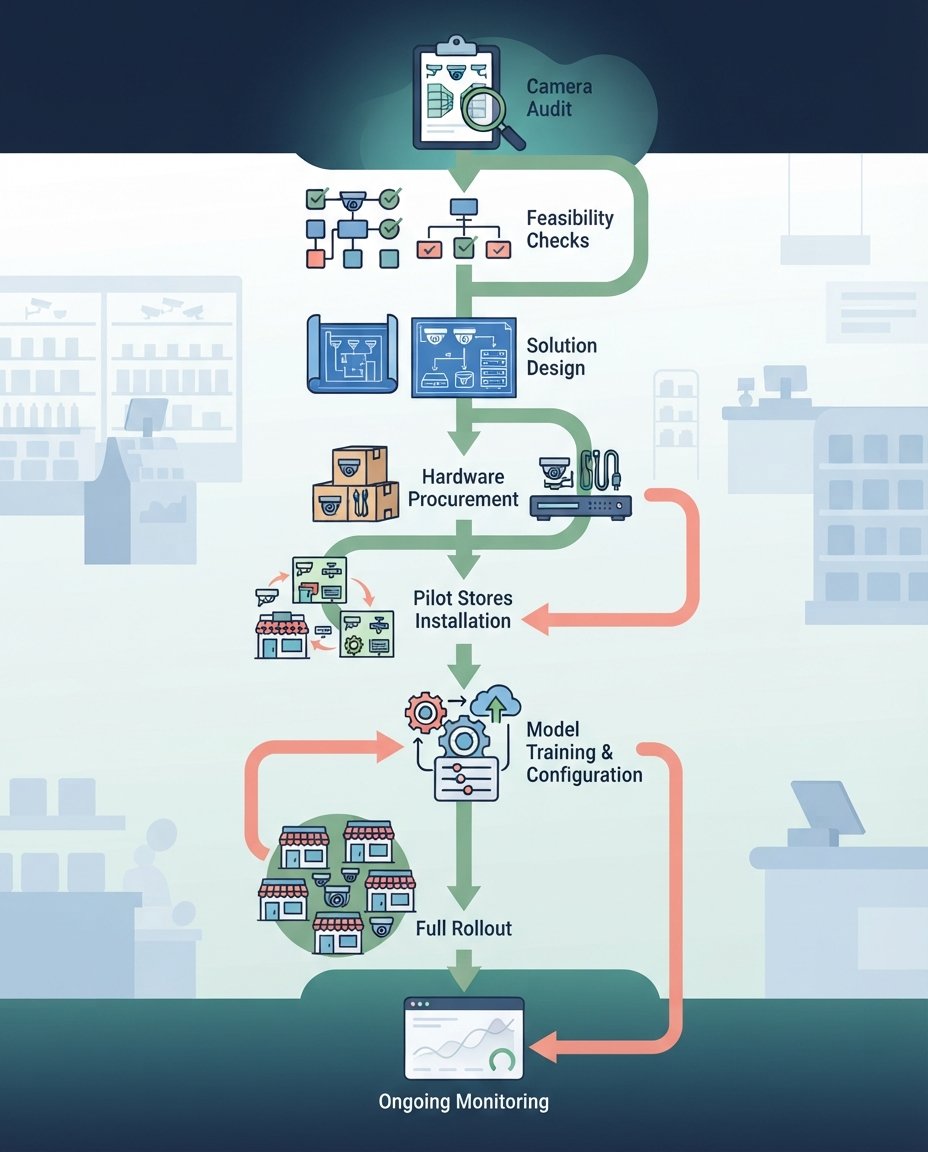
- Define one decision and its owner. Write down the action the system should trigger, for example "notify the aisle associate when a high-velocity SKU is out of stock for more than 15 minutes," and who will act on it.
- Baseline the current KPI. Measure out-of-stock duration, label accuracy, or checkout loss as it stands today. Without a baseline, you cannot prove improvement.
- Audit cameras and collect real sample data. Gather footage from several stores, across different times of day, lighting conditions, and busy periods. Avoid cherry-picked frames.
- Run a feasibility study on labeled samples. Label a representative set and test candidate models. Agree on acceptance thresholds for precision, recall, and alert volume before building anything larger.
- Choose the architecture. Decide what runs at the edge, what runs in the cloud, and which components are managed services versus custom models. Keep interfaces portable so a platform change does not force a rebuild.
- Integrate with operational systems and design human review. Connect events to task management, inventory, POS, or security tools. Build review queues for uncertain detections so staff feedback becomes training data.
- Pilot against control stores. Deploy in a few stores and compare their KPIs with similar stores that do not have the system. Track alert precision and associate response rates, not just model scores.
- Monitor, retrain, and scale. Watch for drift caused by new products, layout changes, and seasonal displays. Schedule retraining, then expand store by store with the same measurement discipline.
What Drives Cost and Effort
Every project differs, but the same factors usually decide the budget:
- Number of stores, cameras, and use cases
- Whether existing cameras can be reused or new hardware is needed
- SKU count and how often the catalog changes
- Labeling effort required to reach target accuracy
- Real-time edge inference versus batch processing
- Integration complexity, especially with older POS or inventory systems
- Ongoing monitoring, retraining, and device fleet management
Where EnDevSols Fits
EnDevSols builds computer vision as production systems rather than demos, using tools such as PyTorch, OpenCV, and YOLO variants. Its computer vision development services start with consulting and feasibility work on your sample data, including what accuracy is realistic and when rules or sensors are a better choice. Relevant capabilities include object detection and tracking for retail shelf and planogram monitoring, OCR, CCTV video analytics with operator review queues, and edge or cloud inference chosen according to latency needs. EnDevSols' service page notes that a focused computer vision project typically takes 6 to 10 weeks from data collection to production, depending heavily on the quality and quantity of labeled data.
Vision output only creates value once it reaches the tools your teams use. For that layer, EnDevSols' custom software development services cover integration and middleware between systems, operational dashboards, and modernization of legacy platforms. If you already have an AI system that performs well in testing but struggles in production, an AI reliability check can help identify which layer is failing and what to fix first.
FAQs
What is computer vision in retail?
Computer vision in retail is the use of AI to analyze images and video from stores, warehouses, and online catalogs. It detects things like empty shelves, incorrect price labels, unscanned items, and shopper traffic patterns, then triggers actions in business systems. It covers both physical stores and ecommerce applications such as visual search.
Which computer vision applications in retail deliver results fastest?
Narrow use cases with clear ground truth tend to prove value fastest. Price label verification, self-checkout monitoring, receiving dock counts, and occupancy analytics are good examples, because results can be checked against POS or inventory data. Shelf monitoring is often high value but requires more work on SKU recognition. Cashierless checkout is usually the slowest and most complex path.
Can retailers use their existing CCTV cameras?
Sometimes, especially for traffic, occupancy, and queue analytics. Security cameras are usually mounted for wide coverage, though, so they often lack the angle and resolution needed for shelf or SKU-level recognition. A camera audit with sample footage is the fastest way to find out what your current setup can support.
Does retail computer vision require facial recognition?
No. Most retail use cases, including shelf monitoring, label checks, checkout prompts, and people counting, work without identifying anyone. Privacy-conscious designs blur faces at the edge and store only anonymous events. Any use case that does involve identification needs careful legal review in each jurisdiction where it operates.
How long does it take to implement computer vision in retail?
A focused, single-use-case project can move from data collection to production in a matter of weeks when labeled data is available. EnDevSols cites 6 to 10 weeks for a focused computer vision project. Multi-store rollouts take longer because each phase involves piloting, integration, and measurement before expansion.
Before you add cameras or buy a platform, test your use case on footage from your own stores. Explore EnDevSols' computer vision development services to validate feasibility on your sample images and scope a production system that connects to the inventory, task, and security tools your teams already use.
SOURCES
External sources cited in the article:
- Google Cloud: Gemini Enterprise Agent Platform Vision documentation (previously Vertex AI Vision), including the deprecation notice and the stream, application, and warehouse pattern. https://cloud.google.com/vision-ai/docs
- Google Cloud: Face blur app tutorial (linked from the documentation above). https://docs.cloud.google.com/vision-ai/docs/face-blur-tutorial
- Google Cloud: Occupancy count app tutorial (linked from the documentation above). https://docs.cloud.google.com/vision-ai/docs/occupancy-count-tutorial
- Google Cloud: Cloud Vision API documentation (listed as a migration path). https://docs.cloud.google.com/vision/docs
- U.S. Federal Trade Commission: official website. https://www.ftc.gov/