
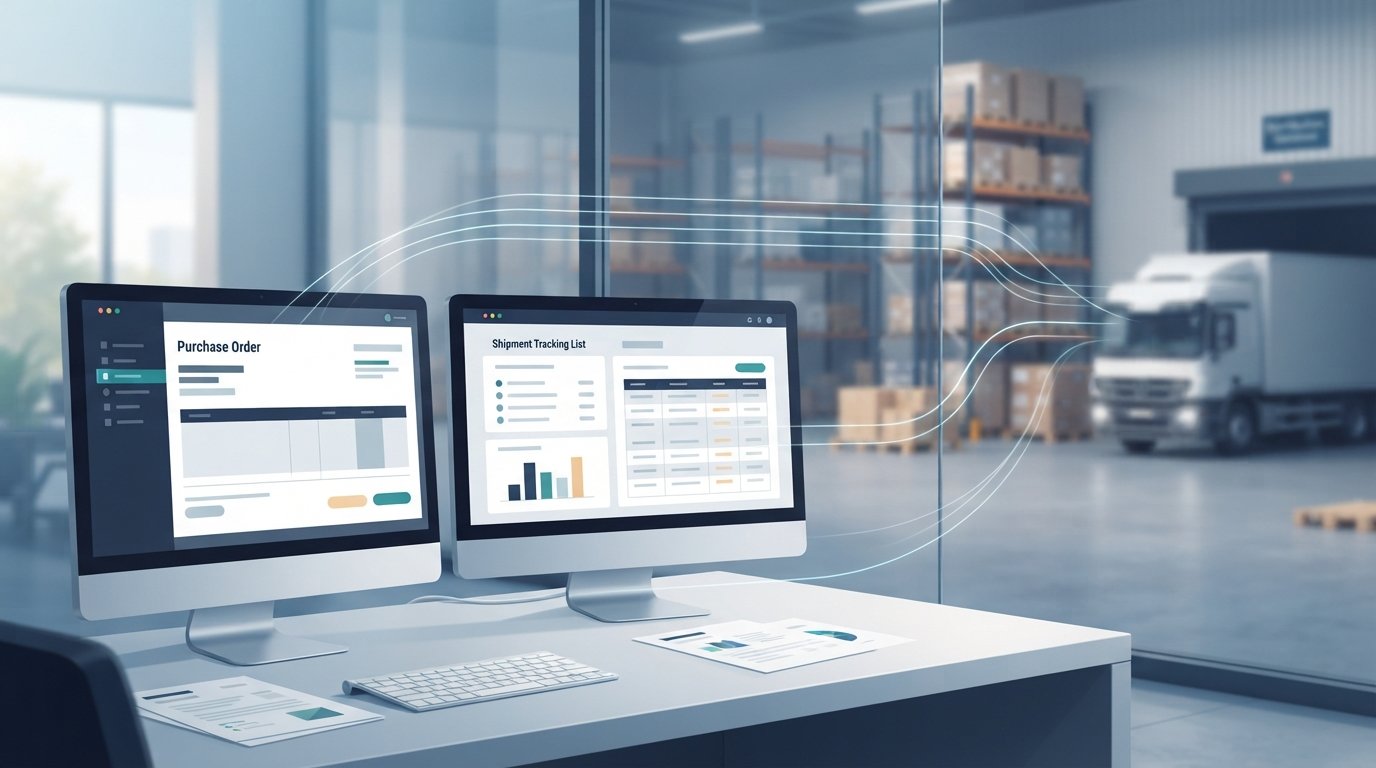
That last point decides whether most supply chain management automation projects succeed. Robotic process automation is a useful tool, but it is one tool among several. Teams that treat it as the default answer often end up maintaining fragile bots that break every time a carrier portal changes its layout.
This guide takes a practical, engineering-first view. You will learn:
- What supply chain RPA actually does under the hood
- A fit test for deciding when RPA beats API integration, AI agents, or custom software
- How a realistic procure-to-pay workflow divides work between bots, document AI, and people
- A step-by-step implementation process, plus the mistakes that cause most failures
- How to secure, govern, and measure automation once it is running
What Is RPA in Supply Chain Management?
RPA in supply chain management is the use of software robots to execute rule-based digital tasks across the systems that run procurement, inventory, transportation, and fulfillment. It works at the user interface layer, so it can automate work in older ERP, warehouse, and carrier systems without changing their code. It does not move physical goods. That is the job of warehouse robotics, which is a separate technology.
The confusion between software bots and physical robots is common, so it helps to be precise. When someone talks about robotic process automation in logistics, they mean a program that clicks, types, and reads screens. They do not mean an autonomous mobile robot carrying totes across a fulfillment center.
How a Software Bot Actually Works
An RPA bot follows a scripted workflow built in a design tool. Platforms such as UiPath, Automation Anywhere, SS&C Blue Prism, and Microsoft Power Automate all use the same core pieces:
- Selectors: References that identify buttons, fields, and tables on a screen so the bot knows where to click or type.
- Triggers: Events that start a run, such as a schedule, a file landing in a folder, an email arriving, or an item entering a work queue.
- Credentials: The login the bot uses to access each application.
- Orchestrator: A central control service that schedules bots, distributes work, stores logs, and reports failures.
- Attended vs. unattended bots: Attended bots run on an employee's desktop when the employee triggers them. Unattended bots run on servers or virtual machines without a person present.
The strength of this design is reach. A bot can work with a 20-year-old green-screen inventory system just as easily as a modern web app.
The weakness is fragility. Selectors depend on the interface staying the same. When a vendor updates a portal, renames a field, or adds a pop-up, the bot can fail or, worse, enter data in the wrong place.
Where RPA Shows Up Across Procurement, Logistics, and Orders
Most supply chain RPA use cases fall into five groups:
- Procurement: Creating purchase orders from approved requisitions, pulling price lists from supplier portals, and updating vendor master data. This is where RPA in procurement usually starts, because the work is repetitive and well defined.
- Order management: Keying orders from structured portal exports or standardized emails into the ERP, updating order status, and sending confirmations.
- Logistics:
- Checking shipment status on carrier portals that offer no API
- Booking freight on carrier websites
- Downloading proof-of-delivery documents
- Updating the transportation management system (TMS)
- Inventory and warehouse: Reconciling stock levels between the warehouse management system (WMS) and the ERP, compiling cycle count variance reports, and flagging items below reorder points.
- Finance-adjacent tasks: Posting validated invoices, checking payment status in banking portals, and downloading remittance files.
Notice the pattern. RPA in logistics and procurement is most valuable where a partner, carrier, or legacy system offers only a screen, not an integration.
RPA is also only one layer of a broader automation stack. If you are evaluating forecasting, risk sensing, or prescriptive analytics, our article on AI-driven supply chain resilience covers that side of the picture.
When Is RPA the Right Fit for Supply Chain Work?
RPA is the right fit when a task is high volume, rule-based, uses structured inputs, and runs in systems that lack a reliable API. If the task requires reading variable documents or making judgment calls, AI agents or document AI are usually a better choice. If the process itself is broken or spans tools that nobody owns, custom software is often the more durable fix.
The fastest way to avoid a bad automation investment is to test each candidate process before choosing a tool.
A Five-Question Fit Test for Supply Chain Automation
Run every candidate process through these five questions. Answer them for each step, not just the process as a whole, because a single workflow often needs more than one approach.
| Question | If the answer is yes | If the answer is no |
| 1. Are the inputs structured and consistent (same fields, same format)? | RPA or API automation can handle it | Consider document AI or an AI agent |
| 2. Can every decision be written as an explicit rule? | Rules-based automation fits | An AI agent with human approval may fit |
| 3. Does the target system offer an API, EDI, or file-based integration? | Use the integration, not screen automation | RPA can bridge the gap |
| 4. Is the interface or process stable over the next 12 months? | RPA maintenance stays manageable | Expect frequent bot breakage; prefer an API or custom software |
| 5. Is a wrong action cheap and easy to reverse? | Full automation is reasonable | Add approval gates and confidence thresholds |
A process that answers "yes" to questions 1, 2, 4, and 5 but "no" to question 3 is a classic RPA candidate. Here is an example:
- Your 3PL provides a daily inventory report only through a web portal.
- Someone downloads it every morning and pastes it into a spreadsheet.
- The report format never changes, and no API is available.
That task belongs to a bot.
RPA vs. API Automation vs. AI Agents vs. Custom Software
Each approach solves a different problem. The table below compares them across the factors that matter most in automated supply chain management.
| Factor | RPA | API automation | AI agents | Custom software |
| How it connects | Through the user interface, like a person | Directly through system APIs, EDI, or webhooks | Calls tools and APIs, reads unstructured content | Becomes the system of record or integration layer |
| Best input type | Structured, fixed layouts | Structured data with defined schemas | Variable emails, documents, and messages | Any, by design |
| Decision logic | Fully rule-based | Fully rule-based | Interpretation at some steps, with guardrails | Encoded business rules and workflows |
| Main failure mode | Breaks when screens or layouts change | Breaks on API version changes, usually with clear errors | Can be confidently wrong without confidence scoring and review | Fails if requirements were scoped poorly |
| Maintenance burden | High where interfaces change often | Low to moderate | Moderate; needs evaluation and monitoring | Owned codebase that needs ongoing engineering |
| Running cost | Low per execution, plus licensing | Low per execution | Per-model-call cost that scales with volume | Hosting and maintenance |
| Supply chain example | Pulling tracking status from a carrier portal with no API | Syncing goods receipts from WMS to ERP | Reading a supplier email that changes a delivery date and drafting the PO update | A supplier portal or operational platform that replaces spreadsheets and email threads |
| Choose it when | No integration exists and the task is stable | An integration exists or can be built | A person currently has to read and decide | The process is the problem, not just the data entry |
EnDevSols' own guidance makes the same distinction. Rules, RPA, and scripts suit fixed, predictable inputs at near-zero cost per execution. AI agents suit variable inputs where a person currently reads and decides, at a per-token cost that scales with volume.1
Our engineering view (opinion, not a universal rule): integrate through APIs or EDI first, and use RPA as a bridge where no integration exists. Use AI agents only for the steps that genuinely need interpretation. When the real issue is that a process spans six tools and a spreadsheet with no owner, a bot only automates the mess. In that case, an operational platform or integration layer built through custom software development usually removes the work rather than speeding it up.

A Realistic Procure-to-Pay Workflow Using RPA, Document AI, and Approvals
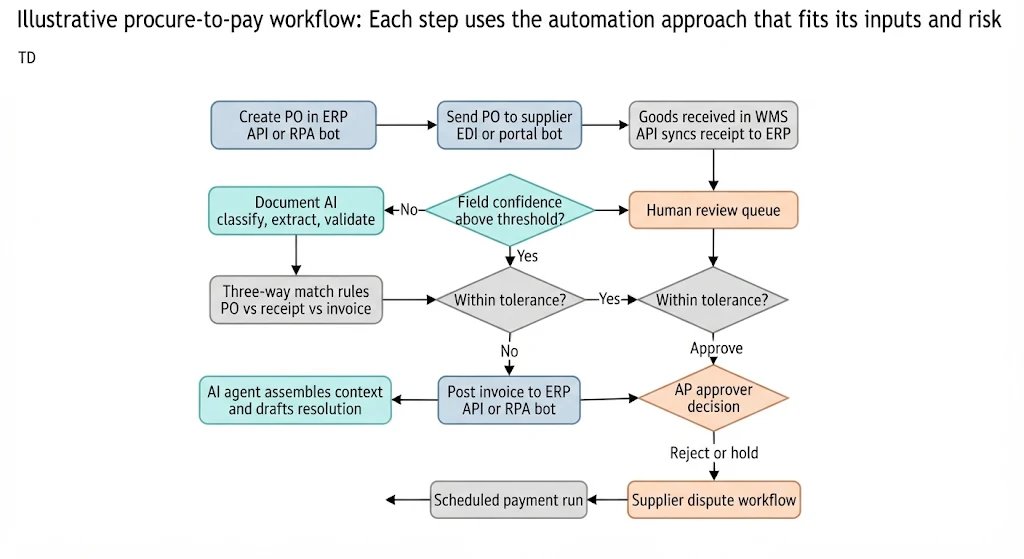
Procure-to-pay shows clearly how RPA, document AI, and human approvals divide the work. The example below is illustrative, not a description of a specific client implementation. It reflects how a mid-sized distributor could automate the path from purchase requisition to supplier payment.
The scenario (illustrative):
- A distributor runs an older ERP with limited API coverage and a newer WMS with a documented API.
- About two-thirds of suppliers email PDF invoices in their own layouts. The rest send invoices through EDI (Electronic Data Interchange, a standard format for exchanging business documents between companies).
- Accounts payable clerks currently key every PDF invoice by hand.
- Purchasing staff spend part of each morning copying approved requisitions into purchase orders.
Here is how the work could be divided:
| Step | What happens | Best tool | Why |
| 1 | Approved requisition becomes a purchase order in the ERP | RPA (API if available) | Structured data, fixed rules, legacy ERP screens |
| 2 | PO is sent to the supplier | EDI for EDI suppliers; RPA for supplier portals | Use the integration where it exists |
| 3 | Goods are received in the WMS and the receipt syncs to the ERP | API integration | The WMS has a documented API, so screen automation adds risk for no benefit |
| 4 | PDF invoice arrives by email | Document AI (intelligent document processing) | Layouts vary by supplier; a fixed bot template cannot read them reliably |
| 5 | Invoice is matched against PO and receipt (three-way match) | Rules engine | Tolerances on price and quantity are explicit rules |
| 6 | Mismatches and unknown suppliers are flagged | AI agent plus human approval gate | Someone must interpret the cause; the agent assembles context and drafts a resolution for an AP clerk to approve |
| 7 | Approved invoice is posted to the ERP | RPA or API | Structured, validated data |
| 8 | Payment run and remittance | ERP scheduler; RPA to download remittance from a bank portal if needed | Routine, scheduled, rule-based |
Why a pure RPA approach would fail at step 4: A traditional bot needs a fixed template for each invoice layout. With dozens of suppliers who change their formats without notice, the template library becomes a maintenance burden, and errors slip through quietly.
An intelligent document processing pipeline handles this step differently:
- It classifies the document type.
- It extracts fields with a confidence score attached to each value.
- It validates those values against your own data.
- It routes low-confidence cases to a person instead of guessing.
That is the approach EnDevSols uses in its intelligent document processing services, which include PO and receipt matching and duplicate detection for accounts payable.
Why step 6 needs a human gate: A price variance might be a supplier error, an agreed price increase that never reached the ERP, or a partial shipment. An AI agent can gather the PO history, the receipt, and the supplier's email thread, then propose a resolution. The decision to pay a disputed amount should still sit with a person until the business trusts the pattern.
The same pattern applies to order-to-cash. Structured orders from customer portals or EDI flow straight into the ERP. Emailed purchase orders in mixed formats go through document AI. Credit holds and pricing disputes go to an agent-assisted human review. Invoices, shipping confirmations, and payment reminders run on rules.
How to Implement RPA in Supply Chain Operations Step by Step
Start with one measurable process, document it in detail, fix it before automating it, and run the bot alongside the manual process before handing over. Build monitoring, exception handling, and clear ownership into the first release rather than a later phase. Scale only after the first automation has proven stable.
Step-by-step implementation process
- Inventory and baseline candidate processes. List repetitive tasks across procurement, logistics, inventory, and order management. For each one, record monthly volume, average handling time, error rate, and exception rate. Without a baseline, you cannot prove the automation worked.
- Apply the fit test and choose one pilot. Pick a process with high volume, stable inputs, low cost of error, and a clear owner. Avoid starting with the most painful process if it is also the most variable.
- Map the process, including every exception. Document each click, system, decision, and edge case. Process mining or task mining tools can help, but interviews with the people who do the work usually reveal the undocumented workarounds that bots will otherwise trip over.
- Simplify and standardize first. Remove unnecessary steps, standardize naming, and agree on rules. Automating a broken process only produces broken output faster.
- Choose the integration method for each step. Prefer APIs, then EDI or file-based exchange, then screen automation as the last resort. One workflow may combine several methods, as the procure-to-pay example shows.
- Build for failure, not just the happy path.
- Use work queues so failed items can be retried without reprocessing everything.
- Make actions idempotent, meaning running them twice does not create duplicate POs or payments.
- Add clear error messages and an exception queue for a human.
- Test against real historical cases, including the awkward ones.
- Run in parallel before cutover. Let the bot process real work alongside the manual team for a defined period, then compare outputs. Move to full automation only when results match and exceptions are understood.
- Go live with ownership, monitoring, and a runbook. Assign a named business owner and a technical owner. Document what to do when the bot fails. Reuse components such as login modules and ERP navigation steps when you scale to the next process, and consider a small center of excellence once you run more than a handful of automations.
Common Mistakes in Supply Chain RPA and How to Avoid Them
- Using screen automation where an API exists. It works on day one and becomes a maintenance liability by month six. Check for APIs, EDI, or export options first.
- Forcing RPA onto unstructured documents. Supplier invoices, bills of lading, and customs paperwork vary too much for template-based bots. Use document AI with confidence scoring and human review.
- Ignoring exceptions during design. The standard path is often the easy part. Partial shipments, credit memos, and duplicate invoices are where bots fail and where the real manual effort sits.
- Running bots under personal employee credentials. When that employee leaves or changes their password, the bot stops, and audit logs show the wrong person performed the actions.
- No owner after go-live. Bots need upkeep when ERP upgrades, portal redesigns, or process changes happen. An orphaned bot is a hidden operational risk.
- Measuring only hours saved. Hours saved can look impressive while exception queues grow and data quality falls. Track accuracy and exception rates alongside throughput.
- Scaling before stabilizing. Ten unstable bots create more work than one manual process. Prove one, then expand deliberately.
How Do You Secure, Govern, and Measure Supply Chain Automation?
Govern supply chain automation like any production system: give every bot a named owner, scoped credentials, audit logs, and a formal change process. Measure it with operational outcomes such as cycle time, exception rate, and first-pass accuracy, not hours saved alone. When AI components are involved, add evaluation, confidence thresholds, and human approval for consequential actions.
Security Controls for Bots and Agents
Software bots often hold broad access to finance, procurement, and supplier systems, which makes them attractive targets. Apply these controls from the first deployment:
- Dedicated service accounts with least privilege. Each bot gets its own identity, limited to the records and actions its workflow requires.
- Credential vaulting. Store bot passwords and API keys in a secrets vault, never in scripts or configuration files.
- Segregation of duties. The same bot identity should not create a supplier, raise a PO, and approve the payment. That rule exists for people for good reason, and it applies to bots too.
- Log redaction and retention rules. Bot logs can capture bank details, pricing, and personal data. Decide what gets logged, who can read it, and how long it is kept.
- Treat incoming content as data, not instructions. When AI agents read supplier emails or documents, malicious text can attempt prompt injection. Enforce permissions outside the model so that no document can expand what the agent is allowed to do.
Governance and Change Management
Keep a central register of every automation that records:
- The process it supports and the systems it touches
- The credentials it uses
- Its business owner and technical owner
- When it was last tested
Tie bot regression testing to your change calendar so that ERP upgrades and portal changes trigger checks before they break production. Retire bots that no longer earn their maintenance cost.
For workflows that include AI, the NIST AI Risk Management Framework provides a useful structure. It is a voluntary framework organized around four functions: Govern, Map, Measure, and Manage.2 NIST has also published a Generative AI Profile (NIST AI 600-1) that identifies risks specific to generative AI and proposes actions to manage them.3
In practice, that means three things:
- Document what each AI step is allowed to decide.
- Evaluate it against real cases before every change.
- Keep people in the loop where an error is expensive.
These are the same controls EnDevSols builds into its AI agent development and workflow automation work:
- Approval gates on consequential actions
- Confidence thresholds with exception queues
- Scoped, least-privilege credentials
- Full observability of each run, including inputs, tool calls, cost, and latency
A Measurement Framework for Supply Chain Automation
Measure against your own baseline from implementation step 1, not against generic industry figures. Review results at 30, 60, and 90 days after go-live, then quarterly.
| Metric | What it tells you | How to measure it |
| Process cycle time | Whether work moves faster end to end | Time from trigger (e.g., invoice received) to completion (e.g., invoice posted) |
| Touchless rate | Share of items completed with no human touch | Items fully automated ÷ total items |
| Exception rate | How often automation hands work back to people | Items routed to review ÷ total items |
| First-pass accuracy | Whether automated output is correct | Items with no downstream correction ÷ items processed |
| Bot run success rate | Technical reliability | Successful runs ÷ total runs, from orchestrator logs |
| Mean time to recover | How quickly failures are fixed | Average time from bot failure alert to restored service |
| Cost per transaction | Whether automation is economical | Licensing, infrastructure, model, and maintenance costs ÷ transactions |
| Business outcome metrics | Whether operations actually improved | Examples: on-time supplier payments, order accuracy, PO cycle time, early-payment discount capture |
A rising exception rate is often the first sign of trouble. It can mean a supplier changed a document layout, a portal changed, or the process drifted. Watch it closely, and treat it as a signal to investigate rather than a cost to absorb.
FAQs
What is an example of RPA in supply chain management?
A common example is a bot that logs into carrier portals each morning, checks the status of open shipments, and updates the transportation management system. It also flags delayed loads for the logistics team. This works well when carriers offer a web portal but no API, and the portal layout rarely changes.
Other examples include creating purchase orders from approved requisitions and reconciling inventory reports between a 3PL portal and the ERP.
What is the difference between RPA and AI agents in logistics?
RPA follows fixed rules on structured inputs and repeats the same steps every time. AI agents can interpret variable content, such as a carrier email announcing a delay, and decide which tools to call next. Agents need confidence scoring, evaluation, and approval gates because they can be wrong in ways rules-based bots are not.
Many logistics workflows use both: bots for the stable steps and agents for the steps that need interpretation.
Is RPA still relevant now that AI agents exist?
Yes. For high-volume, structured, rule-based tasks, RPA remains cheaper to run and easier to audit than an AI agent. The shift is that RPA is no longer the default for everything.
Variable documents and judgment-heavy steps are better handled by document AI or agents. Stable interfaces with APIs are better handled through direct integration.
How is robotic process automation used in procurement?
RPA in procurement typically handles PO creation from approved requisitions, supplier portal data collection, vendor master updates, and posting validated invoices to the ERP. It works best on the structured parts of procure-to-pay.
Supplier invoices in mixed layouts usually need intelligent document processing first, and price or quantity disputes need a human decision.
What are the main limitations of RPA in supply chain operations?
RPA breaks when screens, layouts, or processes change, so maintenance effort can grow quickly across many bots. It cannot reliably read unstructured documents or make judgment calls on its own. It can also automate a poorly designed process without fixing it.
These limits are manageable when you use APIs where possible, design for exceptions, and assign clear ownership to every bot.
Map your supply chain workflows before you automate them. EnDevSols' AI agent development and workflow automation services start with a workflow automation assessment. The assessment maps the process end to end and identifies which steps warrant an AI agent, which are better served by scripted automation or RPA, and which need approval gates before anything runs unattended.
SOURCES
- National Institute of Standards and Technology, "AI Risk Management Framework"
https://www.nist.gov/itl/ai-risk-management-framework
Used for: the AI RMF being voluntary, its January 26, 2023 release, and its four functions (Govern, Map, Measure, Manage). - NIST, "Artificial Intelligence Risk Management Framework (AI RMF 1.0)," NIST AI 100-1
https://nvlpubs.nist.gov/nistpubs/ai/NIST.AI.100-1.pdf
Used for: background reference on AI risk governance structure. - NIST, "NIST AI 600-1, Artificial Intelligence Risk Management Framework: Generative Artificial Intelligence Profile," July 26, 2024
https://doi.org/10.6028/NIST.AI.600-1
Used for: generative AI risk management guidance.