
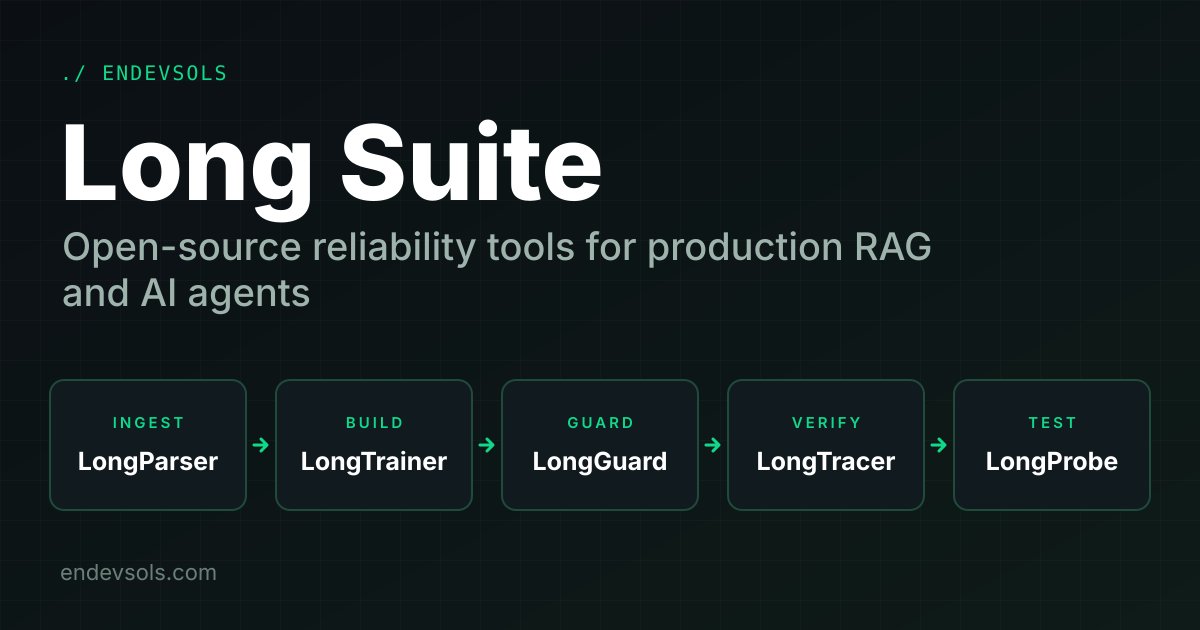
A RAG demo works when the documents are clean, the retriever gets lucky and nobody asks something the corpus cannot answer. A production system has to keep working when none of that holds. RAG reliability means controlling every stage between a raw file and a verified answer: how documents are extracted and chunked, how assistants are isolated per tenant, how agents are stopped when they loop, how answers are checked against evidence, and how retrieval changes are tested before they ship. Long Suite is EnDevSols' open-source toolkit for exactly those stages. This article covers the architecture, the technical design of each of the five tools, working code from their repositories, and how to wire them into one workflow.
Explore the complete Long Suite ecosystem, including its architecture, individual tools, installation instructions, and source code, in the Long Suite GitHub repository.
Why RAG reliability needs more than a vector database
A vector database stores and searches embeddings. It does not tell you whether a table was flattened during extraction, whether two tenants' context leaked into each other, whether an agent has called the same tool nine times, or whether the final answer contradicts the document it cites. Each of those failures happens at a different stage, and a failure at an early stage hides itself later: a badly split chunk becomes a retrieval miss, and a retrieval miss becomes a confident answer built on the wrong evidence.
| Stage | What goes wrong | Long Suite tool |
|---|---|---|
| Ingestion | Lost headings, flattened tables, low-confidence pages, PII embedded in chunks | LongParser |
| Application | Tenant data mixed together, no persistent memory, ad-hoc tool wiring | LongTrainer |
| Agent runtime | Repeated tool calls, reasoning loops, token spikes, cost overruns | LongGuard |
| Generation | Claims that the sources do not support or contradict | LongTracer |
| Change management | Re-chunking, a new embedding model or an index migration silently drops evidence | LongProbe |
The suite separates these concerns on purpose. Each tool is an independent Python package with its own repository, release cycle and issue tracker, so you can adopt the one that matches your biggest risk. For the wider architecture around these tools, see EnDevSols' guide to production-ready RAG systems.
Architecture: five tools across one lifecycle
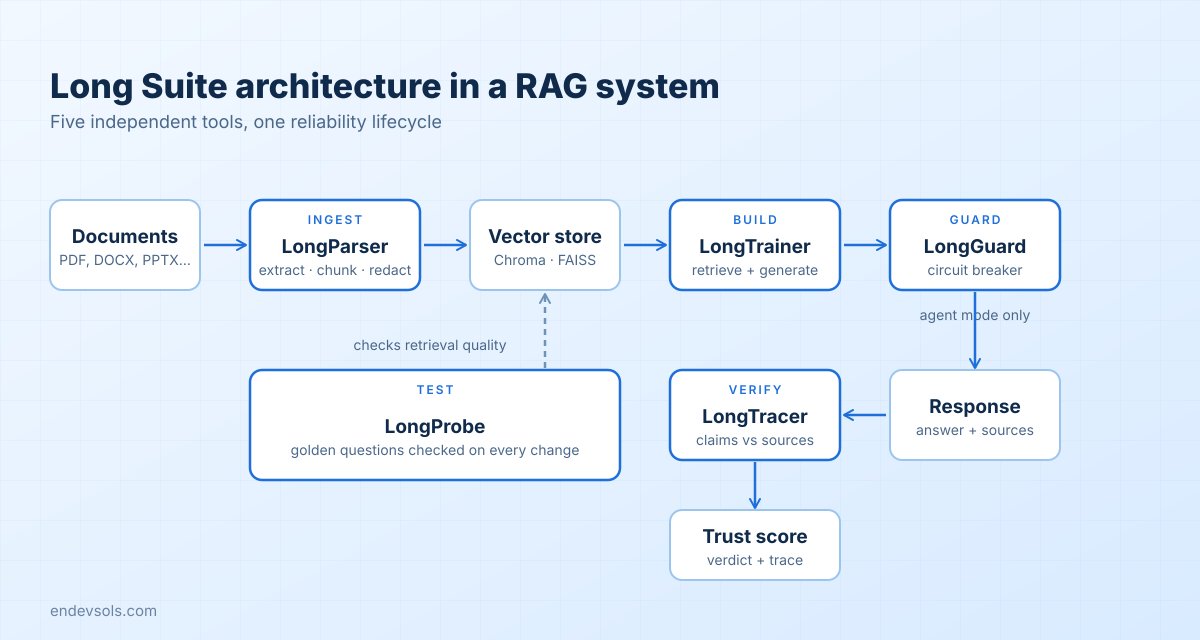
The suite follows the order in which a production AI system is built and operated: Ingest, Build, Guard, Verify, Test. Documents enter through LongParser and leave as validated, AI-ready chunks. Those chunks are indexed in a vector store, and LongTrainer builds the RAG assistant or agent on top of it. While an agent runs, LongGuard watches each step. When a response is produced, LongTracer checks it against the supporting sources. Outside the request path, LongProbe tests the retrieval layer and acts as a quality gate in CI.
That gives three places where the tools run, which is useful when you plan where each one fits in your own stack:
| When it runs | Tools | Input | Output |
|---|---|---|---|
| Build time | LongParser | Raw files | Validated chunks, reviewer decisions |
| Request time | LongTrainer, LongGuard, LongTracer | Questions, agent steps, responses and sources | Answers, guard decisions, trust scores |
| Release time | LongProbe | Golden questions and a baseline | Recall, chunk-level diffs, pass or fail |
Every package installs on its own with pip, and optional extras keep the base install light.
| Package | Base install | Notable extras |
|---|---|---|
| LongParser | pip install longparser | server, chroma, qdrant, faiss-cpu, langchain, llamaindex, gpu / cpu bundles |
| LongTrainer | pip install longtrainer | agent (tool calling), tracer (verification) |
| LongGuard | pip install longguard | langgraph, langchain, embeddings, all |
| LongTracer | pip install longtracer | langchain, llamaindex, haystack, langgraph, otel, mongo, postgres, redis, all |
| LongProbe | pip install longprobe | chroma, openai, all |
None of the tools requires another. LongProbe works without LongTrainer, LongTracer works without LongParser, and LongGuard works with a plain OpenAI or Anthropic loop as well as with LangGraph.
Ingest: how LongParser prepares documents for retrieval
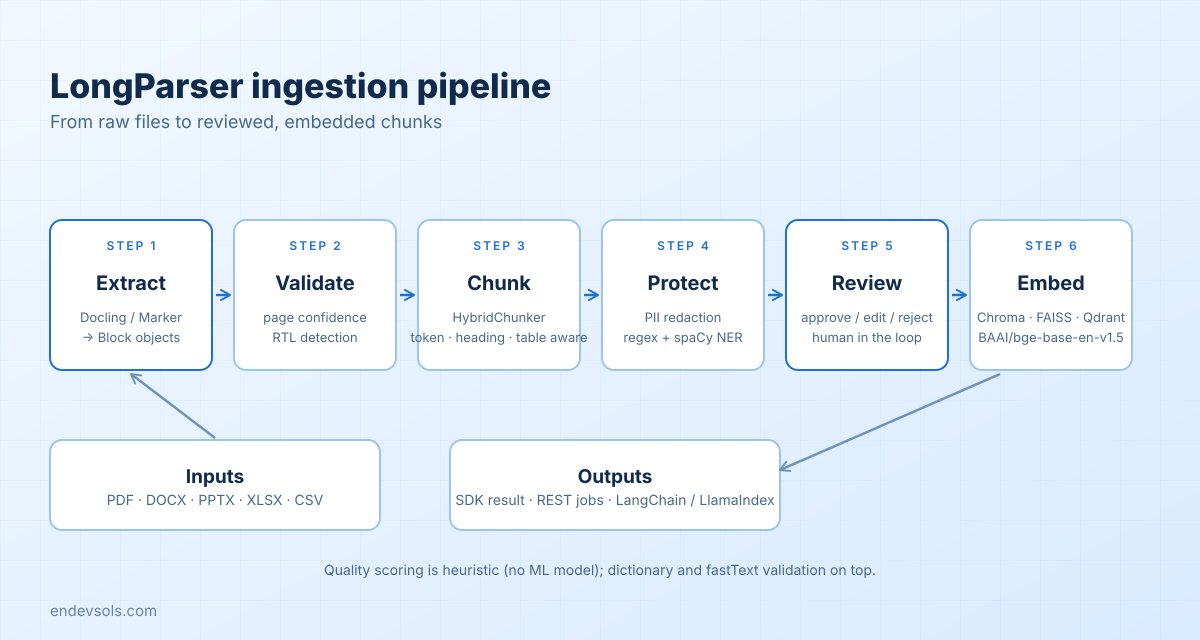
LongParser handles PDF, DOCX, PPTX, XLSX and CSV files. It runs as a staged pipeline, and each stage exists to protect retrieval quality before anything is embedded.
The processing pipeline
- Extract. Docling (with Marker as another supported backend) converts a document into structured
Blockobjects instead of a flat text stream. - Validate. Each page gets a confidence score, and right-to-left text is detected so it can be handled correctly.
- Chunk.
HybridChunkerbuilds chunks that are token-aware, aware of the heading hierarchy and aware of tables. An embedding-based semantic chunker (usingall-MiniLM-L6-v2) is available when boundaries should follow meaning. Charts and figures are cross-referenced deterministically. - Protect. PII redaction combines regular expressions with spaCy named-entity recognition.
- Review. Reviewers approve, edit or reject blocks and chunks through the API before embedding.
- Embed. Approved chunks go into Chroma, FAISS or Qdrant.
Quality scoring is heuristic and needs no ML model, with dictionary and fastText validation on top. The human-in-the-loop step also has a LangGraph variant: an
approve / edit / reject decision uses LangGraph's interrupt() with a MongoDB checkpointer, so a review can pause a run and resume later.Python SDK
from longparser import DocumentPipeline, ProcessingConfig

pipeline = DocumentPipeline(ProcessingConfig())
result = pipeline.process_file("document.pdf")

print(f"Pages: {result.document.metadata.total_pages}")
print(f"Chunks: {len(result.chunks)}")
print(result.chunks[0].text)
The base install (
pip install longparser) is the SDK only, with no server and no PyTorch. pip install "longparser[gpu]" installs everything and still runs in CPU mode on machines without a GPU.Framework adapters
If you already use LangChain or LlamaIndex, LongParser plugs in as a loader or reader:
from longparser.integrations.langchain import LongParserLoader

docs = LongParserLoader("report.pdf").load()  # list of LangChain Documents
from longparser.integrations.llamaindex import LongParserReader
docs = LongParserReader().load_data("report.pdf")REST workflow for review-driven ingestion
With the
server extra, LongParser exposes a FastAPI service. Requests carry an X-API-Key header, and interactive documentation is served at /docs.| Endpoint | Purpose |
|---|---|
POST /jobs | Upload a file as multipart file |
GET /jobs/{job_id} | Check job status |
POST /jobs/{job_id}/finalize | Finalize with a finalize_policy such as approve_all_pending |
POST /jobs/{job_id}/embed | Embed with a provider, model and vector_db |
POST /chat/sessions and POST /chat | Open a session for a job and ask questions against it |
A typical embed request uses
huggingface as the provider, BAAI/bge-base-en-v1.5 as the model and chroma as the vector store. Configuration comes from environment variables, for example LONGPARSER_MONGO_URL, LONGPARSER_REDIS_URL, LONGPARSER_VECTOR_DB and LONGPARSER_RATE_LIMIT, which defaults to 60 requests per minute per tenant. The service provides tenant isolation, role-based access control and CORS settings, and the project states that all processing runs locally.Document chat and conversational retrieval
Beyond document extraction and embedding, LongParser supports conversational question answering over processed documents. Its document-chat functionality combines retrieved document context with a three-layer memory approach to support follow-up questions and more contextual interactions. This allows developers to build document-focused assistants while preserving the structured ingestion, validation, and review capabilities of the underlying pipeline.
Build: LongTrainer for multi-tenant RAG assistants
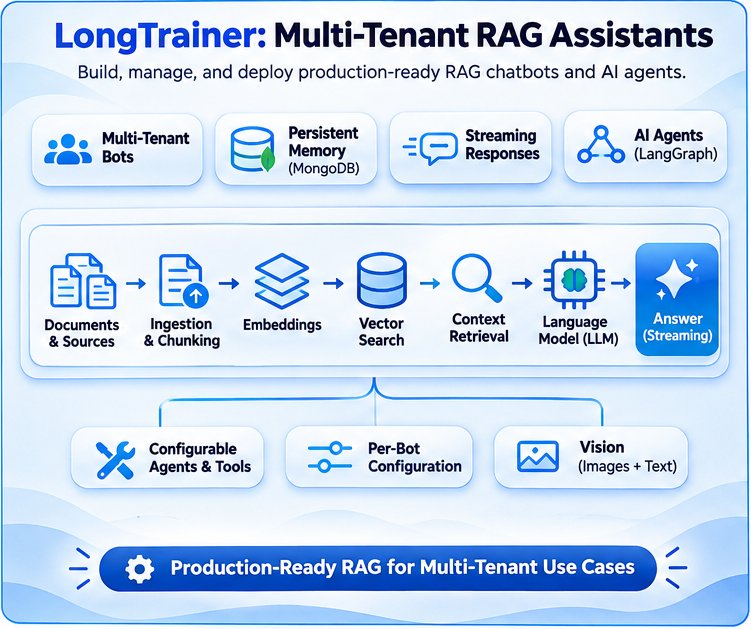
LongTrainer is an open-source framework for building production-ready, multi-tenant RAG assistants and AI agents. It brings together document ingestion, vector storage, intelligent retrieval, persistent conversation memory, streaming responses, and customizable agent tools. Its architecture supports conversational RAG workflows through an LCEL-based RAGBot and agent workflows through a LangGraph-based AgentBot. LongTrainer also supports vision-enabled interactions, allowing applications to work with visual inputs alongside text-based knowledge retrieval.
Quick start
from longtrainer.trainer import LongTrainer

trainer = LongTrainer(mongo_endpoint="mongodb://localhost:27017/")

bot_id = trainer.initialize_bot_id()
trainer.add_document_from_path("path/to/your/data.pdf", bot_id)
trainer.create_bot(bot_id)

chat_id = trainer.new_chat(bot_id)
answer, sources = trainer.get_response("What is this document about?", bot_id, chat_id)
print(answer)
get_response returns the answer together with its sources, which is what you need to feed a verifier later. For token-by-token output, pass stream=True and iterate over the result.Constructor options that matter in production
trainer = LongTrainer(
    mongo_endpoint="mongodb://localhost:27017/",
    llm=None,               # uses the configured default language model
    embedding_model=None,   # default: OpenAIEmbeddings()
    max_token_limit=32000,
    num_k=3,                # chunks retrieved per query
    chunk_size=2048,
    chunk_overlap=200,
    ensemble=False,         # multi-query ensemble retrieval
    encrypt_chats=False,    # Fernet encryption of stored chats
    encryption_key=None,
    enable_tracer=False,    # built-in LongTracer integration
    tracer_backend="mongo", # mongo | sqlite | memory
    tracer_threshold=0.5,
)
Two settings deserve a decision early.
num_k and chunk_size / chunk_overlap control retrieval granularity, and they are the first things to tune when answers feel thin or noisy. encrypt_chats protects stored conversations at rest with Fernet, which matters when chat history contains customer data.Multi-tenancy by design
Every call to
initialize_bot_id() creates an isolated bot with its own sessions, data and configuration, including the LLM, embeddings, num_k, chunk settings and prompt template. One deployment can therefore serve many customers or departments without their documents mixing.Ingestion sources and backends
Besides local files, LongTrainer can ingest from links, search queries, web crawls, AWS S3, Google Drive, Confluence, directories, JSON, GitHub repositories and custom dynamic loaders (
add_document_from_link, add_document_from_crawl, add_document_from_aws_s3 and so on).| Layer | Supported options |
|---|---|
| Vector stores | FAISS (default), Pinecone, Chroma, Qdrant, PGVector, MongoDB Atlas, Milvus, Elasticsearch, Weaviate |
| LLM providers | OpenAI, Anthropic, Google VertexAI / Gemini, AWS Bedrock, HuggingFace, Groq, Together AI, Ollama, any LangChain BaseChatModel |
| Chat memory | MongoDB, optionally Fernet-encrypted |
Agent mode and tools
For workflows that need more than retrieval, create the bot with
agent_mode=True. It runs on LangGraph and can call tools: built-ins such as wikipedia and arxiv, a web-search helper, or your own functions registered with add_tool.from longtrainer.tools import web_search
trainer.create_bot(bot_id, agent_mode=True)
trainer.add_tool(web_search, bot_id)Agents are where runaway behavior appears, so this is also where the next tool, LongGuard, becomes relevant.
A CLI and REST server for quick starts
LongTrainer ships a CLI for fast experiments:
longtrainer init writes a longtrainer.yaml, longtrainer bot create creates a bot, longtrainer add-doc <bot_id> <path> ingests a file, longtrainer chat <bot_id> opens an interactive session and longtrainer serve starts a FastAPI server on port 8000 with 18 REST endpoints and Swagger docs at /docs. Install with pip install longtrainer, or add the [agent] and [tracer] extras when you need agents or built-in verification. Some document types need system packages such as libmagic-dev, poppler-utils, tesseract-ocr, qpdf, libreoffice and pandoc.Cache: LongCache reduces repeated LLM calls and RAG costs
Production RAG systems often receive repeated or semantically similar questions. Without caching, each request may trigger document retrieval and language model inference, increasing latency and token costs.
LongCache is EnDevSols' open-source semantic similarity cache for LLM and RAG pipelines. Instead of relying on exact text matches, it uses local embeddings and FAISS vector search to identify similar queries and reuse eligible cached responses.
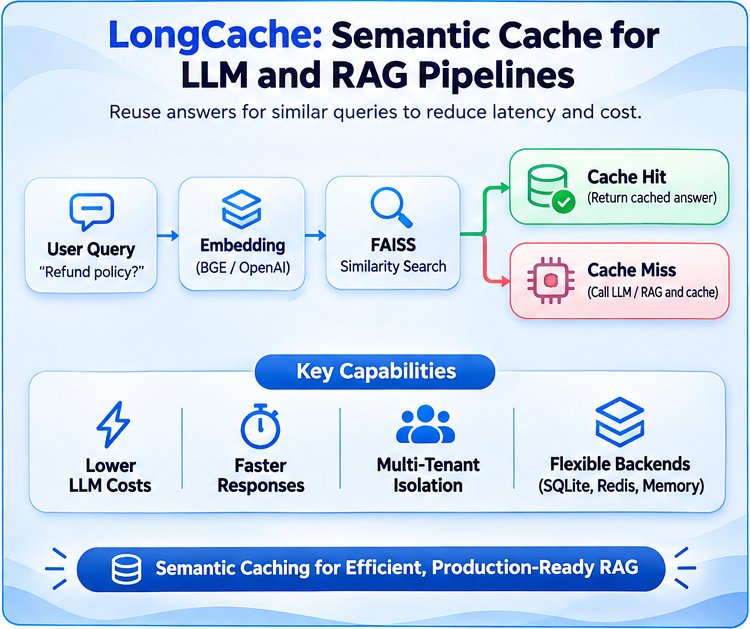
How LongCache Works
LongCache follows a scoped caching workflow:
User Query → Request Scope Validation → Semantic Embedding → FAISS Similarity Search → Cache Hit or LLM Execution → Cached Response
For example, "What is your refund policy?" and "How can I get a refund?" may match the same cached answer when their semantic similarity meets the configured threshold and their request contexts permit reuse.
Core Features
- Semantic caching: Uses BGE-small embeddings and FAISS to identify similar questions.
- Multi-tenant isolation: Separates cached responses using trusted tenant, user, model, prompt, and knowledge-base context.
- Singleflight execution: Combines eligible concurrent requests to avoid redundant model calls.
- Flexible storage: Supports SQLite, Redis, and in-memory backends.
- Cache invalidation: Uses TTLs, tags, and document-version changes to control stale responses.
- Framework integration: Supports OpenAI SDK, FastAPI, LangChain, LangGraph, and LlamaIndex integration patterns.
Getting Started with LongCache
Install the Python package:
pip install longcacheA basic semantic caching example:
from longcache import LongCache, RequestContext, RequestScope

context = RequestContext(
    scope=RequestScope(
        tenant_id="acme",
        user_id="user-1"
    ),
    operation="support.answer",
    provider="openai",
    provider_scope="production",
    model="gpt-4o",
    prompt_version="v1",
    corpus_version="kb-v1"
)

cache = LongCache(context=context)

@cache.cached
def ask_rag(query: str) -> str:
    return expensive_llm_call(query)

answer = ask_rag("What is your refund policy?")
Here,
expensive_llm_call() represents the application's existing RAG or LLM function. Eligible repeated queries can reuse cached results rather than executing the original operation again.Production Considerations
Semantic caching must balance efficiency with answer correctness. Similar questions do not always have interchangeable answers, especially when user permissions, documents, or conversation context differ.
LongCache addresses these risks through scoped request identities, configurable similarity thresholds, and cache invalidation mechanisms. Its documented default similarity threshold is
0.92, which developers should calibrate against representative application queries.Caching complements other Long Suite tools. LongTrainer builds the RAG assistant, LongCache optimizes eligible repeated requests, LongGuard protects running agents, and LongTracer evaluates generated responses against their supporting evidence.
For installation options, caching configuration, and integrations, visit the LongCache GitHub repository.
Guard: LongGuard stops agent loops before they burn budget
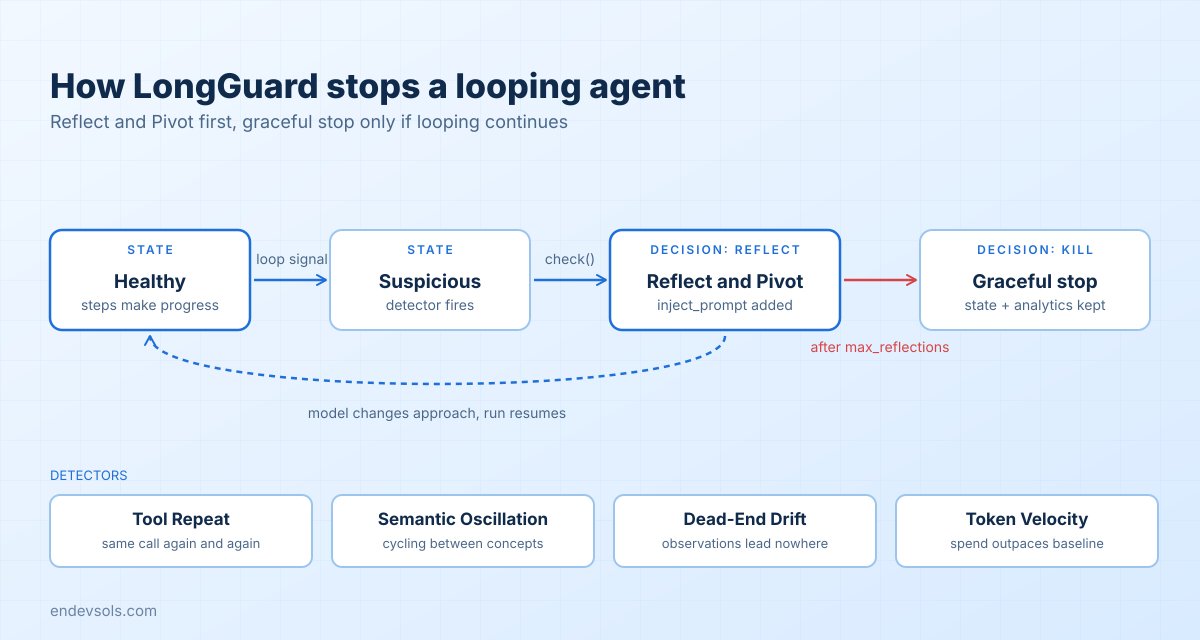
An agent that repeats the same tool call, circles between two answers or quietly consumes tokens is a cost and reliability problem. LongGuard is a circuit breaker for that situation. It watches each reasoning step and decides whether the run should continue, be nudged or be stopped.
Install it with
pip install longguard (Python 3.10 to 3.12). Optional extras are [langgraph], [langchain], [embeddings] and [all].What it detects
| Detector | What it catches | Main knob |
|---|---|---|
| Tool Repeat | The same tool called with the same input again and again | tool_repeat_threshold, tool_repeat_window |
| Semantic Oscillation | Steps that alternate between similar thoughts without progress | Better sentence embeddings with the [embeddings] extra |
| Dead-End Drift | A run that keeps producing observations that lead nowhere | dead_end_threshold |
| Token Velocity | Token use that suddenly outpaces the rolling baseline | token_velocity_multiplier |
On top of the detectors, hard limits apply:
max_steps, max_tokens_per_run, max_reflections and a cost ceiling, max_cost_usd. Setting model lets LongGuard estimate cost for more than 40 models, or you can supply cost_per_input_token and cost_per_output_token yourself.Reflect and Pivot instead of a hard crash
When a detector fires, the first response is not to kill the run. The decision comes back as
reflect, with an inject_prompt that your loop appends to the context so the model can change approach. If the looping continues beyond max_reflections, the decision becomes kill.A graceful stop preserves useful execution information, including conversation state and token analytics, making it easier to diagnose failures and recover safely. Unlike relying solely on LangGraph's
recursion_limit, which raises a GraphRecursionError when the configured limit is reached, LongGuard provides loop detection, configurable intervention policies, and structured execution reports. State recovery depends on the workflow's checkpointing and persistence configuration.Using it in a plain OpenAI loop
from longguard import CircuitBreaker, GuardConfig, AgentStep
from openai import OpenAI
client = OpenAI()

breaker = CircuitBreaker(GuardConfig(model="gpt-4o", max_cost_usd=0.50, max_steps=30))

observation = None
for i in range(1, 31):
    response = client.chat.completions.create(model="gpt-4o", messages=messages)
    step = AgentStep.from_openai_response(response, step_number=i, observation=observation)

    decision = breaker.check(step)
    if decision.action == "kill":
        break
    elif decision.action == "reflect":
        messages.append({"role": "system", "content": decision.inject_prompt})

    if step.action is None:      # the model produced a final answer
        break
    observation = run_tool(step.action, step.action_input)

print(breaker.report.summary())
This example illustrates how LongGuard monitors an OpenAI agent loop and evaluates each execution step. The application must provide the
messages conversation history and implement the run_tool() function to execute tool calls. These components are application-specific and should be connected to the agent's existing message management and tool execution logic.For Anthropic responses, use
AgentStep.from_anthropic_response(response, step_number=i). For any other framework, build an AgentStep yourself with step_number, thought, action, action_input, observation and tokens_used.Framework integrations
For LangGraph,
add_guard_to_graph(workflow, GuardConfig()) attaches the guard to your graph, and the report is available afterwards through get_report().summary(). For LangChain, GuardedAgentExecutor wraps an agent executor with the same protection.Additional integrations and recovery options
Beyond LangGraph and LangChain, LongGuard supports additional integration patterns for controlling agent execution. Its safe LangGraph resume capability enables checkpoint-based recovery of eligible interrupted workflows without unnecessarily repeating completed tool calls. CrewAI integration helps monitor supported multi-agent workflows for repetitive execution and delegation loops. LongGuard also provides a universal
@guarded decorator, allowing developers to apply execution limits and loop detection to custom Python functions, generators, and asynchronous workflows without adopting an entire agent framework.Telemetry
Every run produces a
GuardReport. Its summary() includes step and token counts and an estimated cost, and the report can be saved to and loaded from JSON or YAML, which makes it easy to attach to a ticket or compare across runs.Verify: LongTracer checks every answer against its sources
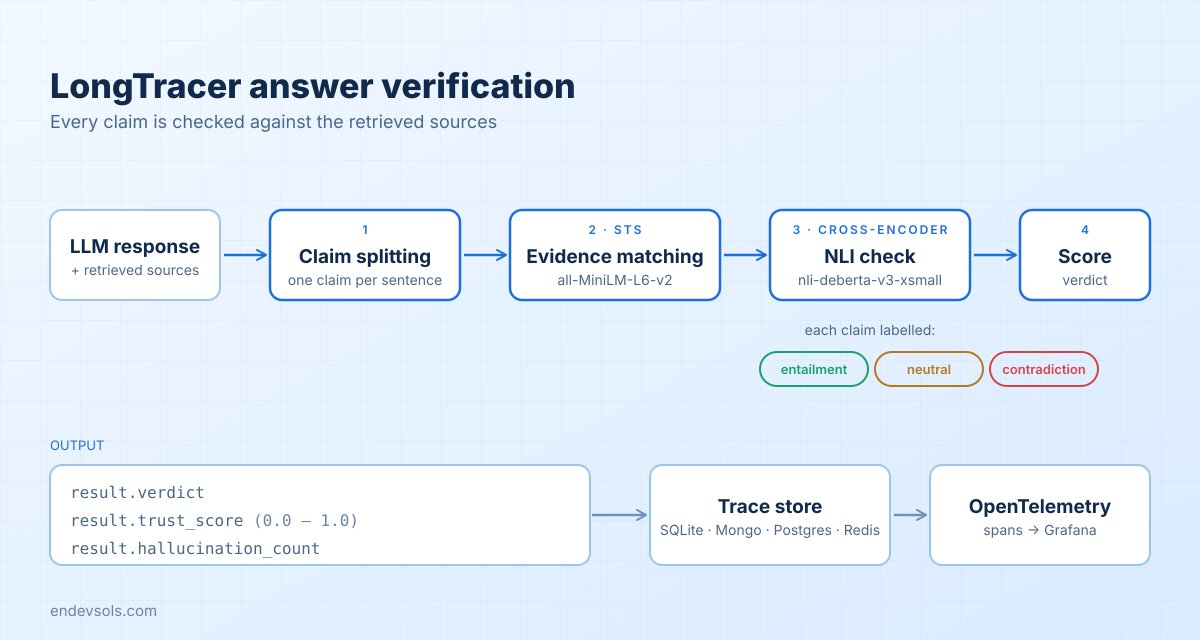
Retrieval can succeed and the model can still invent details. LongTracer detects this by checking each claim in a response against the retrieved sources. It is built for hallucination detection and citation verification in RAG pipelines.
How verification works
- Claim splitting. The response is split into individual sentences, each treated as a claim.
- Evidence matching. A bi-encoder (
all-MiniLM-L6-v2) performs semantic text similarity to find the source passage most relevant to each claim. - NLI verification. A cross-encoder (
nli-deberta-v3-xsmall) classifies each claim against its evidence as entailment, contradiction or neutral. - Scoring. The results roll up into a
trust_scorebetween 0.0 and 1.0, a hallucination count and a verdict.
LongTracer's verification scores provide an automated assessment of how well generated claims are supported by the supplied evidence. They should be treated as configurable quality signals rather than absolute guarantees of factual correctness. For production applications, developers should evaluate verification thresholds against representative, labelled examples and retain human review for high-impact decisions.
Three lines to a verdict
from longtracer import check

result = check(
    response="The Eiffel Tower is 330 meters tall and located in Berlin.",
    sources=[
        "The Eiffel Tower is a landmark in Paris, France. It is 330 meters tall."
    ],
)

print(result.verdict, result.trust_score, result.hallucination_count)
That example, taken from the project's own README, comes back as a failing verdict with one hallucination, because the location claim contradicts the source. From the command line the equivalent is
longtracer check "<response>" "<source>", which prints a compact line such as FAIL trust=0.50 hallucinations=1. For evaluation sets, check_batch accepts a list of {"response": ..., "sources": [...]} items.For more control, use
CitationVerifier(cache=True).verify_parallel(...), or its async version verify_parallel_async, and pass source_metadata when you want results tied back to document names.Instrumenting an existing pipeline
You do not have to call
check by hand. Initialize once and instrument the framework you already use:from longtracer import LongTracer, instrument_langchain
LongTracer.init(verbose=True)
instrument_langchain(chain)Equivalent helpers exist for LlamaIndex (
instrument_llamaindex(query_engine)), LangGraph (instrument_langgraph(graph)), LangChain agents (instrument_langchain_agent(agent_executor)) and Haystack v2 (LongTracerVerifier). LongTrainer can switch the same verification on for you with enable_tracer=True.Where the traces go
| Backend | Notes |
|---|---|
| SQLite | Default, stored at ~/.longtracer/traces.db |
| Memory | Useful in tests |
| MongoDB, PostgreSQL, Redis | For shared or production storage, selected through TRACE_CACHE_BACKEND |
Multiple applications can share one store by setting a
project_name. Settings can live in pyproject.toml under [tool.longtracer] (project, backend, threshold, verbose, log level) with environment-variable overrides.Observability
With the
longtracer[otel] extra, each verification is emitted as an OpenTelemetry span named longtracer.verify, carrying trust_score, hallucination_count and verdict attributes. The repository includes a Grafana dashboard template (grafana/longtracer.json). For local inspection, longtracer view supports --last, --id, --project, --export and --html, and longtracer serve starts a trace dashboard.Choose the pass threshold deliberately. The README examples use 0.5, but the right value depends on how costly a wrong answer is in your product, so calibrate it against a labelled sample of your own answers.
Test: LongProbe catches retrieval regressions before users do
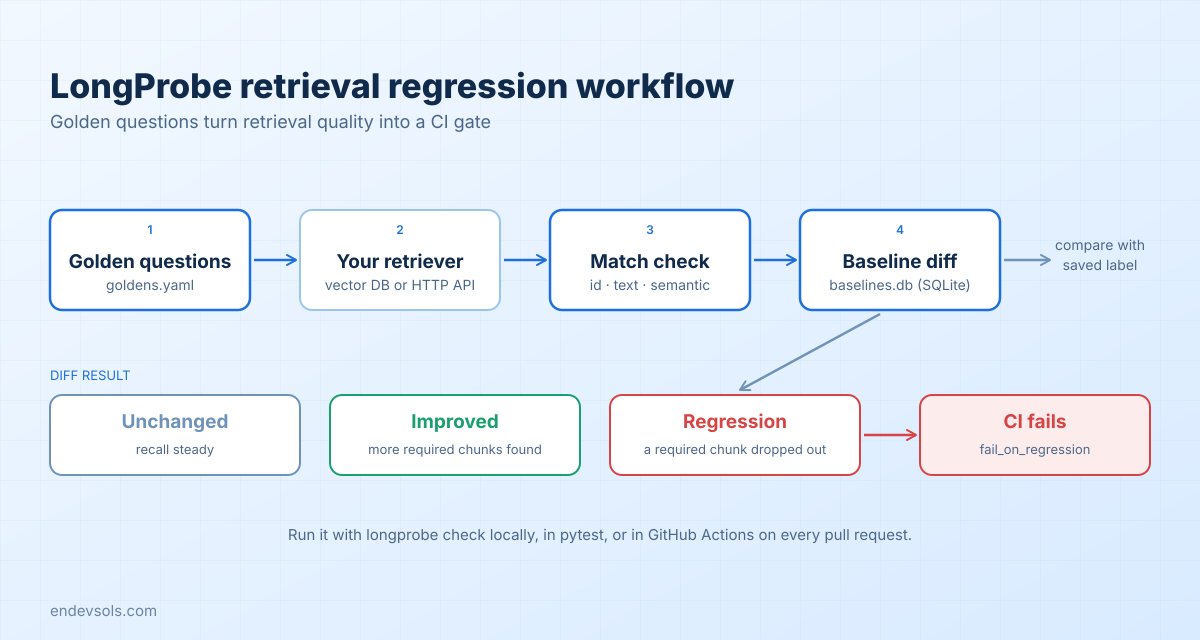
RAG systems often degrade without anyone noticing. A new embedding model, a changed chunk size or a re-indexed collection can quietly push the right passage out of the top results, and the answers get worse with no error to show for it. LongProbe treats retrieval like any other code that needs regression tests: you define golden questions with the chunks that must come back, then check them on every change.
Install with
pip install longprobe, plus optional extras such as chroma, openai or all.Set up golden questions
Run
longprobe init to create a .longprobe/ folder with a goldens.yaml and a longprobe.yaml. Each golden question declares what a correct retrieval looks like:name: support-docs
version: 1
questions:
- id: refund-window
question: "How long do customers have to request a refund?"
match_mode: text
required_chunks:
- "30 days"
top_k: 5
tags: [billing]
- id: sso-setup
question: "How do I configure single sign-on?"
match_mode: semantic
semantic_threshold: 0.80
required_chunks:
- "SAML single sign-on is configured under Security settings"
top_k: 5The three match modes trade strictness for flexibility:
| Mode | A hit means | Best for |
|---|---|---|
id | The exact chunk ID is in the top results | Stable, pinned corpora |
text | A retrieved chunk contains the required text, case-insensitive | Facts that must appear verbatim |
semantic | A retrieved chunk is similar enough, above semantic_threshold (word-frequency cosine similarity) | Content that gets re-chunked or reworded |
Point it at your retriever
longprobe.yaml holds the retriever and scoring configuration: the retriever type and its settings (for example a Chroma persist_directory and collection), the embedder, the recall_threshold, whether to fail_on_regression, and where baselines are stored. Adapters exist for Chroma, Pinecone and Qdrant, a generic HTTP adapter with a body_template using a {question} placeholder, and LangChain and LlamaIndex retrievers.Check, baseline and diff
longprobe check --goldens goldens.yaml          # run all golden questions
longprobe baseline save --label v1              # store the current results
longprobe diff --baseline v1                    # compare a later run against it
longprobe watch --interval 60                   # keep re-checking while you work
Additional testing and dataset management commands
LongProbe also provides commands for building and maintaining retrieval evaluation datasets. Developers can generate candidate golden questions from documents, capture retrieval examples during development, and inspect saved baselines. These capabilities make it easier to expand test coverage as a knowledge base evolves, rather than relying entirely on manually maintained evaluation questions.
# Generate candidate questions from documents
longprobe generate ./docs --auto-capture

# Capture retrieval examples
longprobe capture

# List saved evaluation baselines
longprobe baseline list
Baselines are stored in SQLite at
.longprobe/baselines.db. The diff shows which questions regressed and which improved, which is more useful than a single average score because a recall number can stay flat while one important question breaks.In pytest
from longprobe import LongProbe
from longprobe.adapters import create_adapter

def test_retrieval_quality():
    adapter = create_adapter(
        "chroma",
        collection_name="test_docs",
        persist_directory="./test_db"
    )

    probe = LongProbe(
        adapter=adapter,
        goldens_path="tests/goldens.yaml",
        config_path="longprobe.yaml"
    )

    report = probe.run()

    assert report.overall_recall >= 0.85
In CI
Because
longprobe check --output github produces output suited to GitHub Actions, the check can gate pull requests:name: retrieval-quality
on: [push, pull_request]
jobs:
longprobe:
runs-on: ubuntu-latest
steps:
- uses: actions/checkout@v4
- uses: actions/setup-python@v5
with:
python-version: "3.11"
- run: pip install "longprobe[all]"
- run: longprobe check --goldens goldens.yaml --output github
env:
OPENAI_API_KEY: ${{ secrets.OPENAI_API_KEY }}Adjust the extras and secrets to match your embedder and retriever. If you do not have golden questions yet, the
generate and capture commands can help draft them from your documents or from real traffic.Putting it together: an end-to-end workflow
The tools are independent, but they compose cleanly. Here is how one request travels through a system that uses all five.
- Ingest once. LongParser extracts, validates, chunks and redacts each document. A reviewer approves flagged chunks, and the approved chunks are embedded into the vector store.
- Serve queries. A LongTrainer bot retrieves the top
num_kchunks and generates an answer, returning the sources with it. - Protect agents. If the bot runs in agent mode, a LongGuard circuit breaker checks every step and stops loops or runaway spend.
- Verify the answer. LongTracer compares each claim in the response with the sources and records a trust score, a verdict and a trace.
- Test every change. LongProbe runs in CI against golden questions, so a change to chunking, embeddings or the index cannot ship if retrieval gets worse.
A minimal wiring of steps 2 and 4 looks like this:
from longtrainer.trainer import LongTrainer
from longtracer import check

trainer = LongTrainer(mongo_endpoint="mongodb://localhost:27017/")
bot_id = trainer.initialize_bot_id()
trainer.add_document_from_path("policy.pdf", bot_id)
trainer.create_bot(bot_id)
chat_id = trainer.new_chat(bot_id)

answer, sources = trainer.get_response("What is the refund window?", bot_id, chat_id)

source_texts = [getattr(s, "page_content", str(s)) for s in sources]
result = check(answer, source_texts)
if result.hallucination_count > 0:
    answer = "I could not verify that answer against the documents."
The fallback message is a policy choice, not a library feature. Some teams show the answer with a warning, some route it to a human, and some only log it. LongTracer gives you the signal and leaves the response policy to you.
Where each failure gets caught
| Failure | Caught by | When |
|---|---|---|
| Garbled tables, scanned pages, sensitive data in documents | LongParser | Before indexing |
| Wrong tenant data, weak retrieval settings | LongTrainer configuration | At build time |
| Agent loops and runaway cost | LongGuard | During the run |
| Unsupported or contradicted claims | LongTracer | After each answer |
| Retrieval quality drops after a change | LongProbe | Before release |
Which tool should you adopt first?
You do not need all five on day one. Start with the failure that hurts most today:
- Answers contain facts that are not in your documents: start with LongTracer. It is a few lines to add and gives you a measurable signal.
- Answers got worse after a change and nobody noticed: start with LongProbe and a small set of golden questions.
- Source documents are messy, scanned or sensitive: start with LongParser.
- You are building a multi-customer assistant from scratch: start with LongTrainer.
- Agents loop or your LLM bill is unpredictable: start with LongGuard.
Frequently asked questions
Is Long Suite one package or five?
Five independent pip packages:
longparser, longtrainer, longguard, longtracer and longprobe. Install only the ones you need. Each works on its own.Do I have to use LongTrainer to use the other tools?
No. LongTracer, LongGuard and LongProbe work with LangChain, LlamaIndex and plain Python code. LongTrainer is the optional all-in-one builder that has built-in hooks for tracing.
Does LongTracer replace human review?
No. It automates a first check of every answer against its sources, which makes review scalable. For high-stakes domains you should still sample answers, calibrate the threshold on labelled data and keep a human in the loop.
Is it free to use?
The projects are open source. LongTrainer and LongGuard are published under the MIT license, and the repositories are on GitHub under the ENDEVSOLS organization, where you can check each project's license before adopting it.
Get started with Long Suite
Every repository is on GitHub under the ENDEVSOLS organization: LongParser, LongTrainer, LongGuard, LongTracer, LongProbe and the umbrella project Long-Suite. Questions and ideas are welcome in the Long Suite discussions, and a star helps other engineers find the project.
If you are planning a production RAG system and want a team that has built these pieces, read our guide to production-ready RAG systems or learn how we approach RAG system development and knowledge bots. You can find more engineering write-ups on the EnDevSols blog, or reach the team through endevsols.com.
Reliable RAG is not one clever trick. It is a lifecycle of ingestion, building, protection, verification and testing, and Long Suite gives each stage an open-source tool you can adopt at your own pace.