
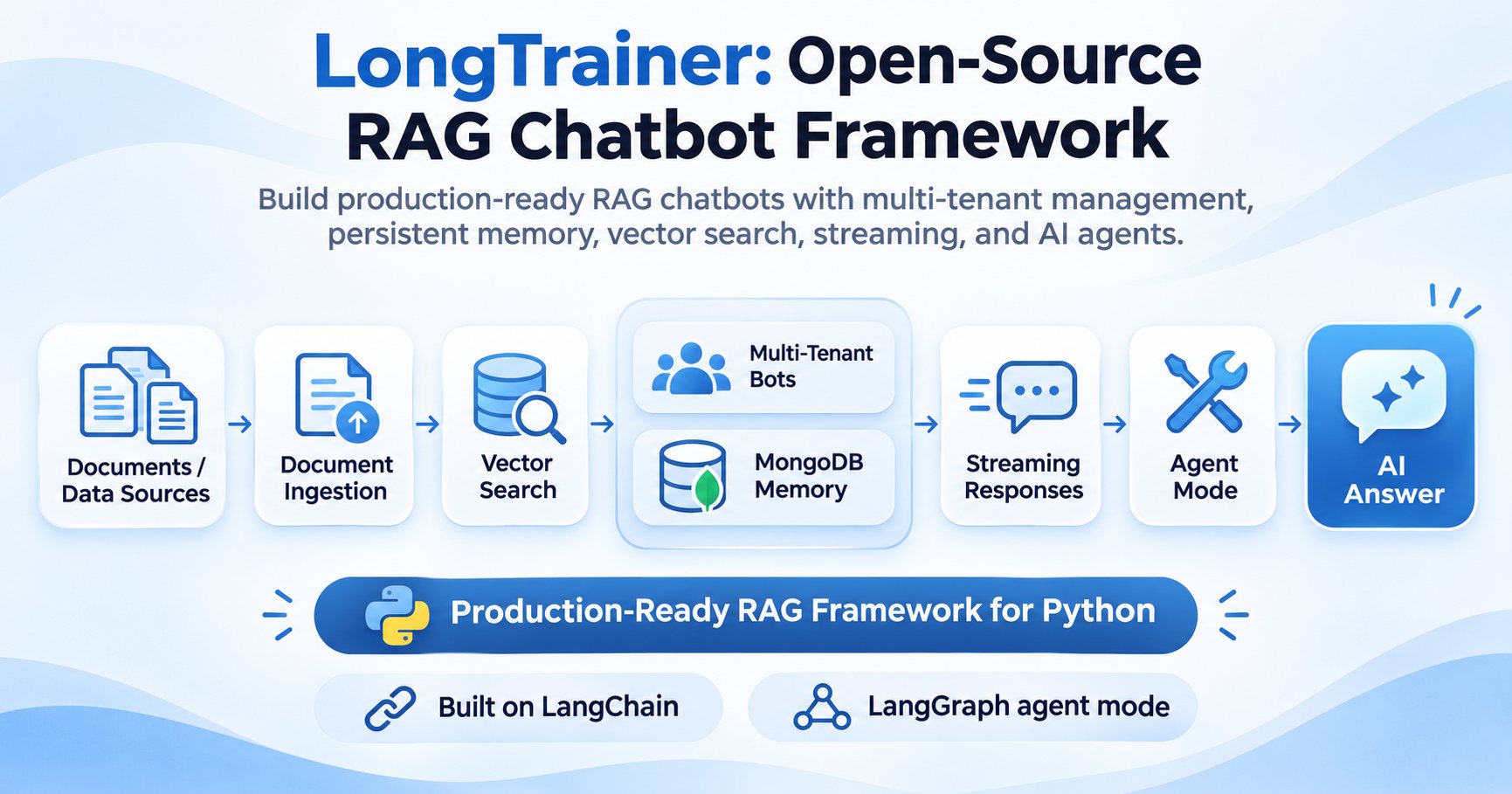
A RAG chatbot framework helps developers build AI assistants that answer questions using external knowledge rather than relying entirely on a language model's training data. However, building a production RAG chatbot requires more than connecting documents to an LLM. Developers must handle document ingestion, vector retrieval, conversation memory, user sessions, streaming responses, tool execution, and application reliability.
LongTrainer is EnDevSols' open-source Python framework for developing retrieval-augmented generation applications and multi-tenant AI chatbots. Built on LangChain, it combines document ingestion, vector search, persistent conversation memory, streaming, agent workflows, and configurable language models.
Instead of implementing each component independently, developers can use LongTrainer to create document-aware assistants through a unified Python API or command-line interface.
This guide explores LongTrainer's architecture, features, Python SDK, agent capabilities, integrations, production considerations, and practical use cases.
Why Production RAG Chatbots Need More Than Basic Retrieval
A basic RAG application retrieves relevant document passages and passes them to a language model to generate an answer.
The typical workflow is:
Documents → Extraction → Chunking → Embeddings → Vector Database → Retrieval → LLM → Answer
This approach works for prototypes, but production applications introduce additional requirements.
A customer-support assistant may need multiple independent knowledge bases, persistent conversations, streaming responses, and secure document access. An enterprise research assistant may also need external tools and the ability to restore previous sessions.
Common Challenges in Production RAG Systems
| Challenge | Typical requirement | LongTrainer capability |
|---|---|---|
| Multiple chatbots | Separate data and configurations | Multi-bot management |
| Conversation history | Restore previous conversations | MongoDB-backed memory |
| Document retrieval | Search relevant knowledge | FAISS and other vector stores |
| Response latency | Display answers progressively | Streaming responses |
| External information | Execute tools and searches | LangGraph agent mode |
| Different AI models | Configure models independently | Per-bot LLM configuration |
| Application integration | Expose chatbot functionality | Python SDK and REST API |
LongTrainer brings these capabilities together, reducing the amount of application-specific orchestration developers must implement.
What Is LongTrainer?
LongTrainer is an open-source Python framework for building document-aware chatbots and agentic RAG applications.
Its core architecture builds on LangChain for language-model integrations and retrieval workflows. LangGraph supports agent execution when tool-calling behavior is required.
LongTrainer also provides MongoDB-backed conversation history and configurable vector retrieval, with FAISS among its supported vector-store options.
Core Features of LongTrainer
- Multi-tenant chatbot management: Create multiple bots with independent configurations and sessions.
- Persistent conversation memory: Store and restore chat history using MongoDB.
- Document ingestion: Load documents and information from supported files, URLs, and external services.
- Vector search: Retrieve relevant document passages before generating answers.
- Streaming responses: Deliver generated output incrementally.
- AI agents and tools: Build tool-enabled assistants with LangGraph.
- Model customization: Configure language models, embeddings, prompts, and retrieval parameters per bot.
- Observability: Integrate with LongTracer for tracing and evidence-based response verification.
These capabilities make LongTrainer suitable for both document Q&A applications and more advanced AI assistant workflows.
LongTrainer Architecture: From Documents to Intelligent Chatbots
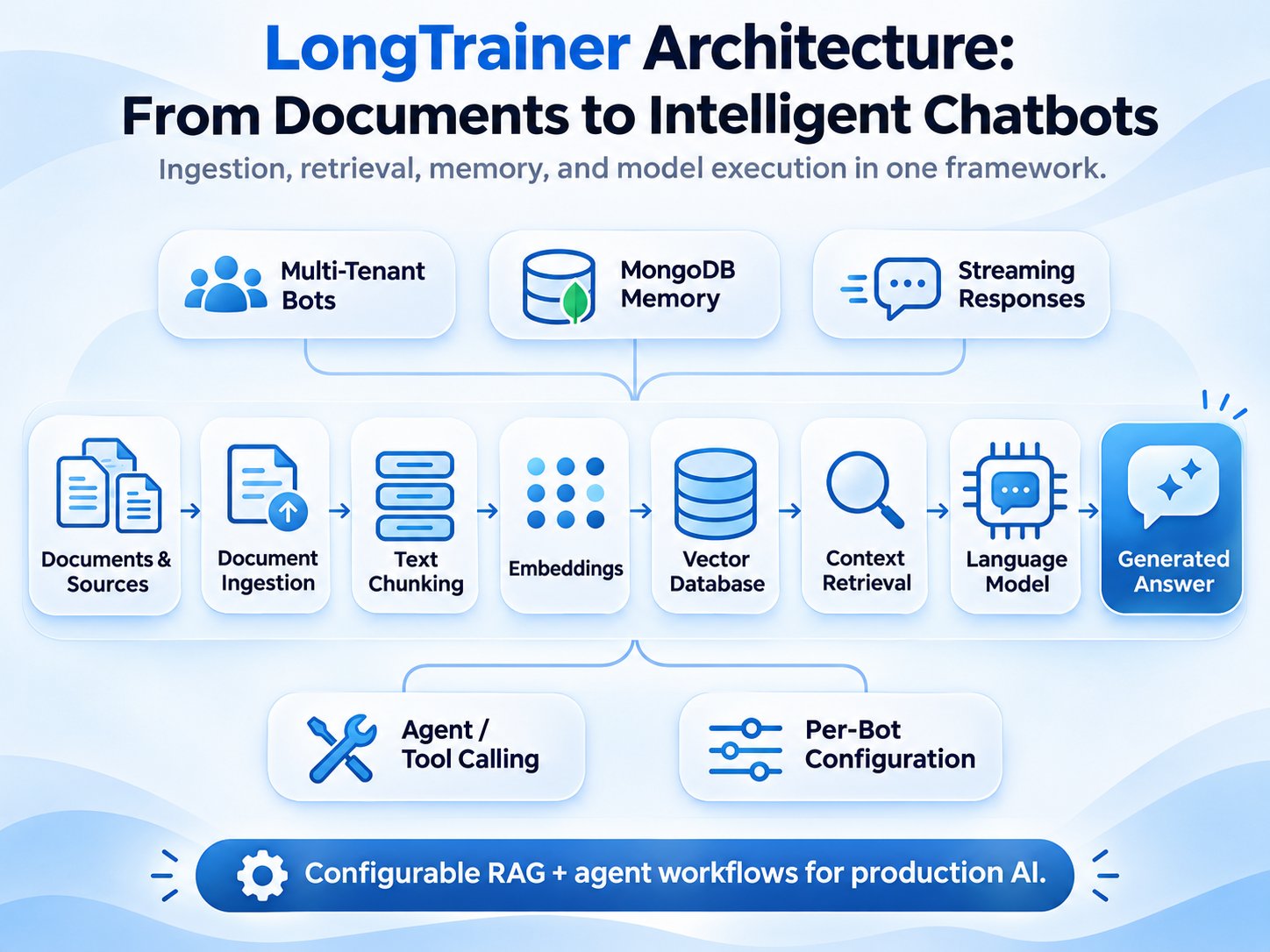
LongTrainer combines document ingestion, retrieval, language-model execution, and conversation management within a configurable application architecture.
The main workflow can be represented as:
Documents → Document Ingestion → Text Chunking → Embeddings → Vector Search → Context Retrieval → Language Model → Generated Answer
Conversation memory and bot configuration operate alongside this retrieval workflow.
1. Document Ingestion
LongTrainer accepts common document formats, including PDF, DOCX, CSV, HTML, Markdown, and TXT.
The repository also documents ingestion methods for web resources and external systems such as Amazon S3, Google Drive, Confluence, and GitHub repositories.
Supported integrations depend on the relevant loaders, credentials, and installed dependencies.
2. Embeddings and Vector Search
Extracted content is divided into chunks and converted into vector representations using an embedding model.
LongTrainer supports FAISS and documents integration with additional vector databases, including Chroma, Pinecone, Qdrant, PGVector, Milvus, and other supported backends.
During retrieval, the system searches for relevant document content and uses those passages to construct the model's context.
3. Language Model Execution
LongTrainer uses LangChain-compatible language models to generate responses.
Developers can configure models independently for different bots, allowing applications to select models according to quality, cost, latency, and deployment requirements.
4. Persistent Conversation Memory
LongTrainer maintains conversation history through MongoDB-backed storage.
This allows applications to restore previous chat sessions instead of treating every interaction as a new conversation.
Persistent history does not guarantee that every previous detail will remain available to the model. Context selection and token limits still affect what information is included during generation.
5. Agent and Tool Execution
For workflows requiring external actions, LongTrainer provides an agent mode using LangGraph.
Agent applications can invoke registered tools, retrieve additional information, and use their results when constructing responses.
Tool execution should be configured with appropriate permissions and operational safeguards.
Getting Started with LongTrainer: Installation and Python SDK
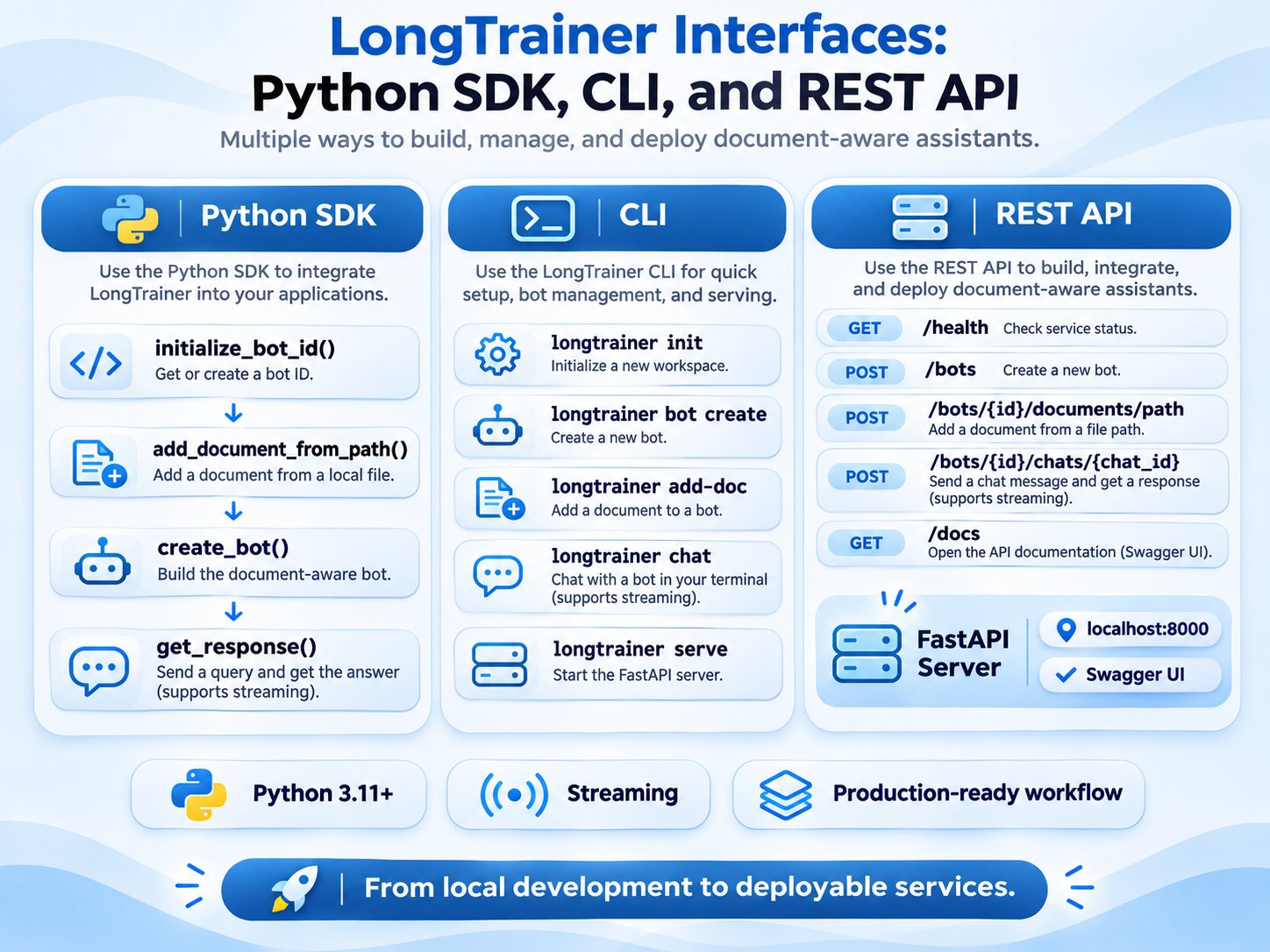
LongTrainer provides a Python SDK and command-line tools for creating document-aware chatbots.
Installation
Install the standard package:
pip install longtrainerFor optional agent support:
pip install "longtrainer[agent]"For optional LongTracer integration:
pip install "longtrainer[tracer]"LongTrainer's current repository documentation specifies Python 3.11 or newer. MongoDB and any selected model-provider credentials must also be configured.
The repository separately documents unreleased 1.4.0 features that require a source installation.
Build Your First Document-Aware Chatbot
The following example follows the project's documented Python SDK workflow.
from longtrainer.trainer import LongTrainer

# Requires a configured OPENAI_API_KEY
# and a running MongoDB instance.

trainer = LongTrainer(
    mongo_endpoint="mongodb://localhost:27017/"
)

# Initialize an independent bot
bot_id = trainer.initialize_bot_id()

# Add a local document
trainer.add_document_from_path(
    "documents/company_policy.pdf",
    bot_id
)

# Build the chatbot
trainer.create_bot(bot_id)

# Start a conversation
chat_id = trainer.new_chat(bot_id)

# Ask a document-grounded question
answer, sources = trainer.get_response(
    "What is the company refund policy?",
    bot_id,
    chat_id
)

print(answer)
The example illustrates the main development process: initialize a bot, ingest documents, construct the retrieval workflow, create a conversation, and request an answer.
The document path must exist, and the application must have access to its configured dependencies.
Understanding the Main SDK Methods
| Method | Purpose |
|---|---|
initialize_bot_id() | Create a bot identifier |
add_document_from_path() | Ingest a local document |
create_bot() | Build a configured chatbot |
new_chat() | Create a conversation session |
get_response() | Generate an answer |
load_bot() | Restore a previously configured bot |
add_tool() | Register an external tool |
train_chats() | Feed previous Q&A into the knowledge base |
The framework's unified interface reduces the need to manually coordinate separate retrieval, memory, and chatbot-management components.
Multi-Tenant Chatbot Management and Persistent Memory
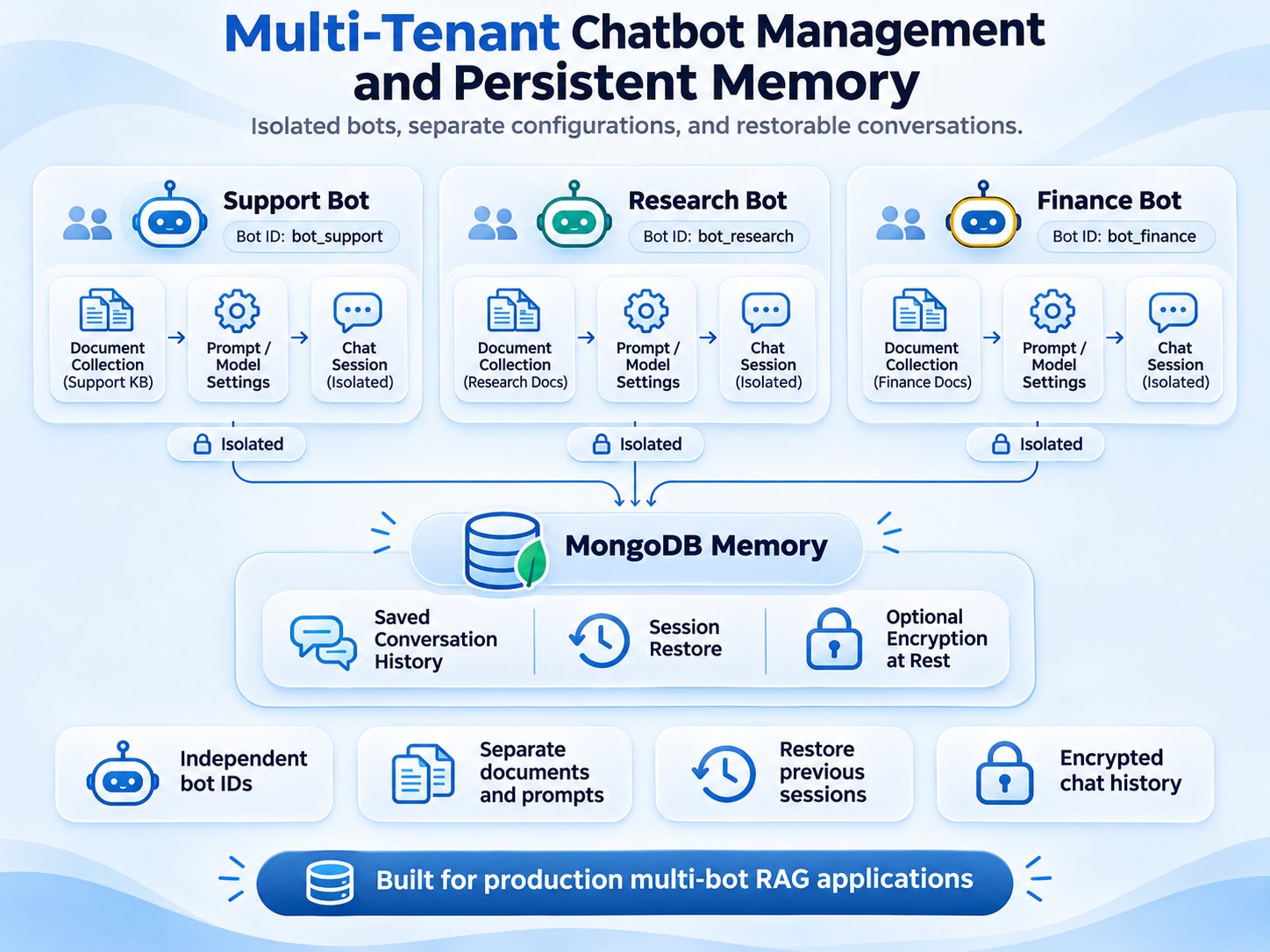
Multi-tenant RAG applications may serve different customers, teams, departments, or projects.
Each chatbot can require a separate document collection, prompt, language model, and conversation history.
LongTrainer supports managing these bots independently.
Per-Bot Configuration
Developers can customize the underlying language model, embeddings, retrieval configuration, and prompts.
For example:
from langchain_openai import ChatOpenAI, OpenAIEmbeddings

trainer.create_bot(
    bot_id,
    llm=ChatOpenAI(
        model="gpt-4o-mini",
        temperature=0.2
    ),
    embedding_model=OpenAIEmbeddings(
        model="text-embedding-3-small"
    ),
    num_k=5,
    prompt_template=(
        "You are a helpful document assistant. "
        "Use the following context: {context}"
    )
)
This flexibility allows applications to use different configurations for customer support, technical documentation, or internal research.
MongoDB Conversation Persistence
LongTrainer stores chat history using MongoDB and documents support for restoring existing bots.
The framework also provides optional Fernet-based encryption for stored conversations.
For production deployments, encryption should be combined with secure key management, database authentication, access controls, and appropriate data-retention policies.
Multi-bot separation should not be treated as a substitute for application-level tenant authorization. Developers must independently enforce which users can access particular bots, documents, and conversations.
Streaming Responses for Real-Time AI Chatbots
Streaming allows an application to display generated output progressively rather than waiting for the entire response.
This improves perceived responsiveness, especially when answers require substantial generation time.
LongTrainer supports synchronous and asynchronous streaming interfaces.
Synchronous Streaming
for chunk in trainer.get_response(
    "Summarize the main findings",
    bot_id,
    chat_id,
    stream=True
):
    print(chunk, end="", flush=True)
Asynchronous Streaming
async for chunk in trainer.aget_response(
    "Explain the document",
    bot_id,
    chat_id
):
    print(chunk, end="", flush=True)
Streaming is useful for interactive web applications, customer-support interfaces, and AI research assistants.
Production systems should also handle interrupted streams, connection failures, cancellation, and output validation.
AI Agents and Tool Calling with LangGraph
Not every user request can be answered from a document collection alone.
Some questions require external information, calculations, or interaction with application services.
LongTrainer supports an agent execution mode that allows developers to register tools and make them available to a chatbot.
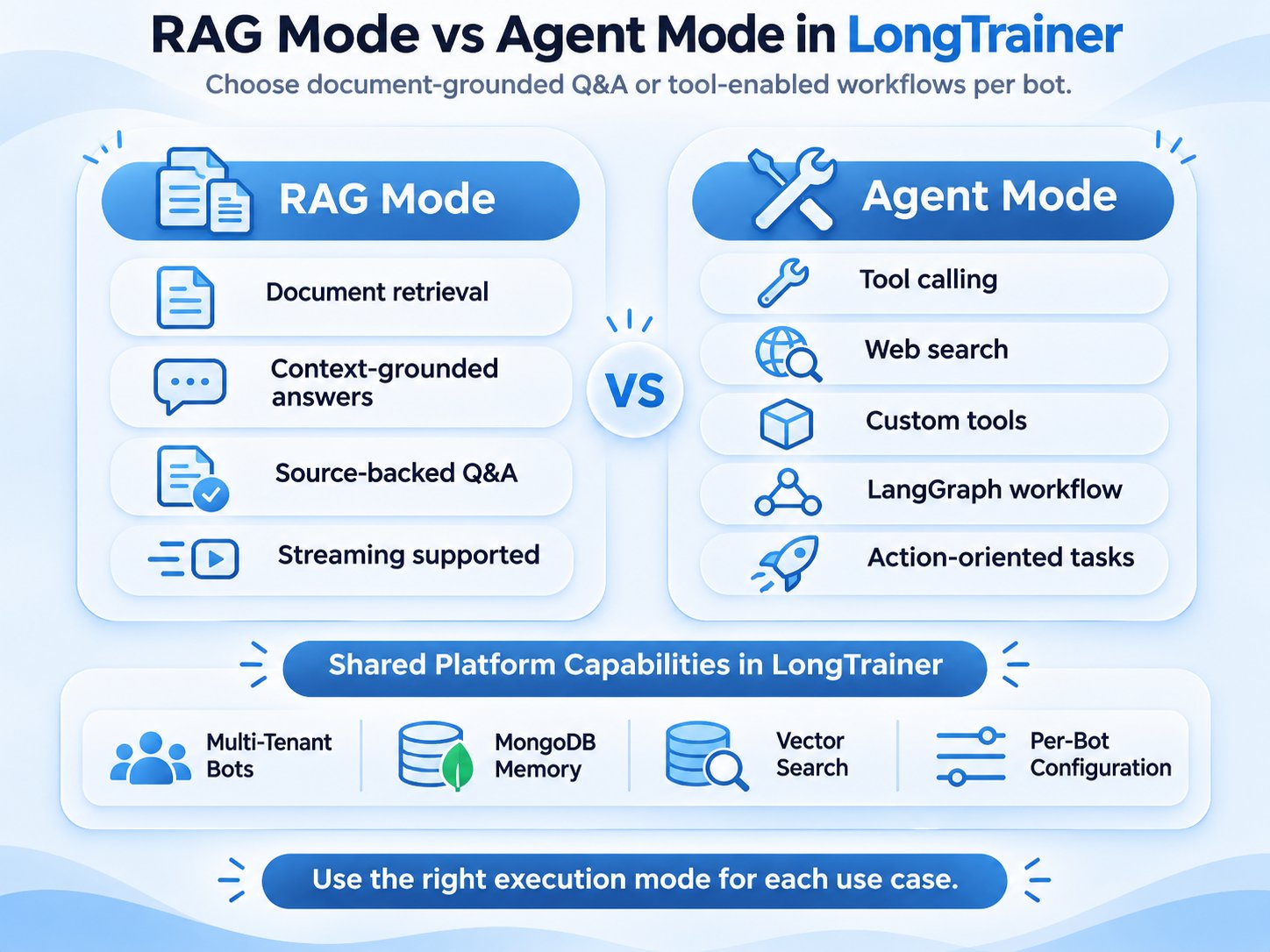
RAG Mode vs. Agent Mode
| Capability | RAG mode | Agent mode |
|---|---|---|
| Document-based answers | Primary workflow | Can be included |
| Knowledge retrieval | Yes | Yes, when configured |
| External tools | Not the primary execution path | Supported |
| Tool calling | No general agent loop | Supported |
| Typical use | Document Q&A | Research and tool-enabled tasks |
Registering a Custom Tool
from langchain_core.tools import tool

@tool
def multiply(left: float, right: float) -> float:
    """Multiply two numbers."""
    return left * right

trainer.add_tool(multiply, bot_id)

trainer.create_bot(
    bot_id,
    agent_mode=True
)

chat_id = trainer.new_chat(bot_id)

response, sources = trainer.get_response(
    "What is 42 multiplied by 17?",
    bot_id,
    chat_id
)

print(response)
This example demonstrates how an application can expose a Python function to the agent runtime.
Tools that execute code, access files, query databases, or communicate with external services require particular care because they operate with the permissions available to the application.
Named Agent Types in LongTrainer 1.4.0
The repository's unreleased 1.4.0 development version additionally documents purpose-specific agents.
| Agent type | Intended purpose |
|---|---|
| Research | Research tasks and source gathering |
| Coding | Programming and tool-assisted workflows |
| Financial | Financial-news research and calculations |
| Customer support | Document-grounded support responses |
These interfaces are documented for the source-install development version and should not be assumed to be available in every published package installation.
Developers should check the repository's release status and installation instructions before using them.
Document Ingestion and Vector Database Integration
A production RAG chatbot depends on reliable document ingestion and retrieval.
LongTrainer documents ingestion from local documents, websites, structured data, and external knowledge sources.
Supported Ingestion Sources
| Source category | Examples |
|---|---|
| Local files | PDF, DOCX, CSV, TXT, Markdown |
| Web content | URLs and web pages |
| Enterprise systems | Google Drive, Confluence |
| Cloud storage | Amazon S3 |
| Developer resources | GitHub repositories |
| Structured content | JSON and directory-based sources |
The availability of particular sources depends on compatible document loaders and their required dependencies.
Retrieval Configuration
LongTrainer supports configurable retrieval parameters, including:
num_kfor controlling the number of retrieved documents.chunk_sizefor text splitting.chunk_overlapfor preserving context between chunks.ensemblefor enabling multi-query retrieval behavior.
Retrieval quality depends on source-document quality, chunking strategy, embedding selection, and query characteristics.
Developers should evaluate retrieval accuracy using representative questions rather than relying only on successful document ingestion.
Deploying LongTrainer Through CLI and REST API
LongTrainer includes command-line functionality for initializing projects and managing chatbot workflows.
Command-Line Setup
longtrainer initCreate a bot:
longtrainer bot create --prompt "You are a helpful assistant."Add a document using the bot identifier returned by the CLI:
longtrainer add-doc BOT_ID documents/manual.pdfStart chatting:
longtrainer chat BOT_IDFastAPI Server
The repository also documents a FastAPI server.
Install the required API and CLI dependencies for the corresponding package version, then run:
longtrainer serveThe documented development server uses:
http://localhost:8000Interactive API documentation is available at:
http://localhost:8000/docsDocumented API routes include health checks, bot management, document ingestion, and chat operations.
Before public deployment, teams should independently configure authentication, authorization, HTTPS, request limits, monitoring, and infrastructure security.
LongTrainer Observability and LongTracer Integration
Production RAG applications require visibility into more than whether an API request succeeds.
Developers also need to understand retrieval behavior, response quality, recurring failures, and model execution.
LongTrainer documents an optional integration with LongTracer for tracing and hallucination detection.
Install the optional integration:
pip install "longtrainer[tracer]"The framework exposes configuration options for enabling tracing, selecting a storage backend, and configuring verification behavior.
LongTracer can provide additional evidence-based verification signals for generated answers. These signals help identify potentially unsupported statements but do not guarantee factual correctness.
Monitoring should be supplemented with representative evaluation data, error analysis, and human review for consequential applications.
LongTrainer Production Best Practices and Real-World Use Cases
A framework can provide the building blocks for production RAG systems, but deployment quality depends on how those components are configured and operated.
Best Practices for Production RAG
1. Enforce tenant-level access controls
Verify that every document, conversation, and bot operation is restricted to authorized users. Test for cross-tenant data exposure.
2. Evaluate retrieval quality
Measure whether the system retrieves relevant evidence. Review missing information, incorrect chunks, and potentially misleading matches.
3. Protect persistent conversations
Secure MongoDB access, manage encryption keys, and define retention policies for stored chat histories.
4. Monitor latency and cost
Measure document ingestion time, retrieval latency, model inference time, token usage, and streaming responsiveness.
5. Restrict agent tools
Use least-privilege permissions, require approval for high-impact operations, and isolate tools capable of executing code or accessing sensitive services.
6. Validate AI-generated answers
Use evaluation datasets, source inspection, and appropriate human oversight. Do not treat fluent responses as automatically reliable.
Real-World Use Cases
| Use case | How LongTrainer can help |
|---|---|
| Customer support | Build document-aware support assistants |
| Enterprise knowledge | Search internal documentation |
| Research assistants | Combine retrieval with supported tools |
| Product documentation | Answer technical questions from manuals |
| Multi-tenant SaaS | Manage independently configured chatbots |
| Internal operations | Retrieve information from company knowledge |
| AI agent applications | Build assistants with tool-calling workflows |
The framework can be incorporated into larger applications without requiring every chatbot-management component to be implemented from scratch.
LongTrainer Limitations and Production Considerations
LongTrainer provides an integrated development framework, but reliable deployment still requires engineering work.
Important considerations include:
- Retrieval limitations: Missing or irrelevant source content can lead to weak answers.
- Model uncertainty: LLMs can generate unsupported statements even when relevant evidence exists.
- Infrastructure dependencies: MongoDB, model providers, and selected document loaders must be configured.
- Agent security: External tools can introduce operational and security risks.
- Context limitations: Persistent memory does not guarantee that all historical information reaches the model.
- Cost and latency: Embeddings, tool execution, retrieval, and model inference consume resources.
- Release compatibility: New features documented in the development repository may not yet exist in the published package.
Production readiness should therefore be established through deployment-specific testing, security review, monitoring, and evaluation.
LongTrainer and the Long Suite Ecosystem
LongTrainer is part of EnDevSols' Long Suite ecosystem, which covers different stages of the production RAG lifecycle.
| Project | Primary role |
|---|---|
| LongParser | Document extraction and preparation |
| LongTrainer | RAG chatbot development and orchestration |
| LongTracer | Response verification and tracing |
| LongProbe | Retrieval regression testing |
These projects address complementary concerns.
LongParser focuses on preparing document content for retrieval, while LongTrainer provides the application framework for building knowledge-based assistants.
LongTracer can help evaluate generated answers against supporting evidence.
The Long Suite repository documents how these components fit into the wider RAG lifecycle.
Developers can select individual projects according to their architectural needs rather than assuming every component must be adopted together.
Frequently Asked Questions About LongTrainer
What is LongTrainer?
LongTrainer is an open-source Python RAG framework for building document-aware AI chatbots with vector retrieval, conversation memory, streaming, and configurable agent capabilities.
Is LongTrainer built on LangChain?
Yes. LongTrainer uses LangChain for model and retrieval integrations and supports LangGraph-based agent workflows.
Can LongTrainer create multiple chatbots?
Yes. It provides multi-bot management with independent configurations, document collections, and conversation sessions.
Does LongTrainer support persistent chat memory?
Yes. LongTrainer documents MongoDB-backed conversation history and restoration of existing bots.
Which vector databases does LongTrainer support?
Its documentation lists FAISS, Chroma, Pinecone, Qdrant, PGVector, Milvus, and additional vector database integrations.
Can LongTrainer stream AI responses?
Yes. LongTrainer provides synchronous and asynchronous streaming interfaces for generating responses progressively.
Does LongTrainer support AI agents?
Yes. Agent mode supports tool calling through LangGraph. The repository also documents additional named agent types in its unreleased 1.4.0 development version.
Is LongTrainer free and open source?
Yes. LongTrainer is available on GitHub under the MIT License. Developers should review the repository's license and dependency requirements before distribution or deployment.
Does LongTrainer guarantee accurate answers?
No. Answer quality depends on source documents, retrieval performance, language models, and application configuration. Automated verification can provide useful signals but cannot guarantee correctness.
Get Started with LongTrainer
LongTrainer offers a practical foundation for developing production-oriented RAG chatbots with document retrieval, persistent memory, streaming responses, multi-bot management, and optional agent capabilities.
Its Python SDK and CLI help developers build document-aware assistants while retaining control over model selection, retrieval parameters, and application integrations.
For installation instructions, supported integrations, examples, and the latest development status, explore the LongTrainer GitHub repository.
By combining reliable document preparation, configurable retrieval, chatbot orchestration, and ongoing evaluation, development teams can build more maintainable and measurable RAG applications.